'%20fill='%23fff'%20fill-rule='evenodd'%20clip-rule='evenodd'%20d='M1.94516e-05%200.0202086C0.0420195%201.22421%2015.477%2022.8672%2025.974%2036.4392C80.466%20106.895%20148.48%20166.337%20231.974%20216.477C250.654%20227.694%20271.214%20239.258%20308.974%20259.785C390.041%20303.855%20418.027%20323.655%20445.375%20356.29C457.567%20370.839%20458.267%20370.657%20438.242%20358.146C387.532%20326.465%20356.693%20316.359%20305.474%20314.635C278.901%20313.741%20256.584%20316.015%20228.224%20322.508C219.385%20324.532%20216.216%20326.29%20221.407%20326.29C233.608%20326.29%20264.586%20334.87%20282.263%20343.145C295.881%20349.52%20314.974%20361.858%20314.974%20364.283C314.974%20364.695%20312.612%20365.334%20309.724%20365.703C241.199%20374.463%20154.183%20428.191%2092.562%20499.79C75.09%20520.091%2071.7%20524.859%2077.035%20521.628C78.926%20520.482%2084.728%20516.968%2089.927%20513.819C112.706%20500.021%20145.195%20487.437%20169.935%20482.828C181.824%20480.613%20205.552%20478.817%20211.298%20479.696L216.122%20480.435L203.794%20493.112C142.137%20556.516%20104.948%20625.881%2092.913%20699.925C90.533%20714.569%2090.783%20715.586%2094.806%20707.641C105.92%20685.691%20127.936%20659.716%20144.474%20649.04C150.781%20644.969%20158.103%20641.29%20159.899%20641.29C160.273%20641.29%20161.083%20648.827%20161.699%20658.04C165.47%20714.441%20188.011%20764.593%20226.674%20802.603C262.563%20837.887%20306.066%20866.035%20398.474%20913.767C434.747%20932.503%20444.973%20937.877%20458.974%20945.562C570.722%201006.9%20619.955%201060.37%20650.021%201153.06C653.459%201163.66%20656.39%201172.21%20656.535%201172.06C656.68%201171.91%20657.989%201166.17%20659.445%201159.29C682.51%201050.31%20655.152%20934.035%20584.506%20840.79C562.617%20811.9%20543.899%20791.508%20489.954%20737.79C426.931%20675.032%20411.607%20655.099%20405.006%20627.29C392.323%20573.863%20438.939%20538.423%20500.849%20554.425C526.675%20561.1%20544.604%20577.062%20549.915%20598.107L551.59%20604.743L564.032%20606.485C634.063%20616.289%20704.147%20646.368%20736.626%20680.561C749.96%20694.598%20749.787%20706.055%20736.132%20713.269L732.474%20715.202L742.766%20715.246C753.94%20715.294%20764.079%20713.573%20776.282%20709.556L784.091%20706.987L786.782%20708.95C791.451%20712.357%20797.8%20722.825%20799.144%20729.336C800.681%20736.776%20800.851%20736.757%20806.282%20728.54C830.903%20691.286%20836.954%20633.079%20820.076%20595.855L817.271%20589.667L808.372%20586.346C782.299%20576.613%20762.637%20558.586%20741.181%20524.743C729.885%20506.926%20727.08%20500.527%20723.898%20485.323C719.333%20463.505%20718.535%20461.808%20707.053%20449.509C690.138%20431.393%20684.217%20423.522%20661.746%20389.29C602.592%20299.172%20519.411%20225.38%20413.356%20168.936C385.699%20154.217%20328.981%20128.949%20327.322%20130.609C327.135%20130.796%20332.883%20134.879%20340.096%20139.682C394.802%20176.112%20443.502%20218.504%20467.755%20250.806C475.015%20260.475%20485.69%20277.926%20484.843%20278.74C484.64%20278.936%20480.199%20275.945%20474.974%20272.096C430.93%20239.644%20400.199%20223.792%20315.974%20190.078C174.722%20133.537%20108.045%2094.3042%2016.767%2014.0202C7.53105%205.89621%20-0.0139805%20-0.403791%201.94516e-05%200.0202086ZM592.467%20436.927C603.971%20451.343%20612.149%20463.814%20615.502%20472.054C626.595%20499.317%20631.458%20503.825%20657.974%20511.427C664.299%20513.24%20674.182%20517.081%20679.937%20519.961C685.691%20522.842%20690.502%20525.096%20690.627%20524.971C690.752%20524.845%20688.519%20521.149%20685.664%20516.757C682.81%20512.364%20678.077%20504.207%20675.147%20498.629C668.633%20486.227%20664.825%20482.16%20649.462%20471.196C634.986%20460.866%20585.876%20426.936%20584.662%20426.427C584.187%20426.228%20587.699%20430.953%20592.467%20436.927Z'/%3e%3c/svg%3e)
Notifications
Eleven triggers, each in 15 languages, plus a feed in the Cockpit.
Available notifications
| Trigger | Recipient |
|---|---|
| New shift offer | Security officer |
| Assignment by the scheduling team | Security officer |
| Sickness report | Scheduling team |
| Reminder 60 minutes before the shift starts | Security officer |
| Check-in missing, 10 minutes after the start | Security officer and scheduling team |
| Forgotten check-out | Security officer |
| Patrol due | Checked-in security officers |
| Patrol missed | Scheduling team |
| Evidence expires soon or has expired | Security officer |
| New notice on the notice board | Security officer |
| Payment reminder and dunning levels | Customer |
Setup
The delivery channel is set on the server. By default, it is set to logging, so nothing is sent until the delivery channel is configured. The same applies to the object storage used for photos and evidence.
In the app, the "Push for new jobs" switch reflects the device's actual system status, not a stored preference. Turning it off and signing out remove the device from the server.
Broadcasts to the team
In addition to automatic notifications, you can send an announcement to the team from the communication center, with a title and text, written freely or taken from a template, to all active security officers or to a selection.
The available delivery channels are "Push" or "Push and WhatsApp". WhatsApp is only sent to security officers who have consented to it and have a phone number stored. If consent is missing, only the push notification is sent. This is not treated as an error and is shown separately in the delivery log.
Limit: no more than five WhatsApp broadcasts per day. Every announcement is recorded in the delivery log, even if it reached nobody.
A note about delivery: to ensure that announcements arrive reliably at any time, we configure WhatsApp delivery for you once. Contact us if announcements also need to arrive reliably outside this window.
Notification center in the Cockpit
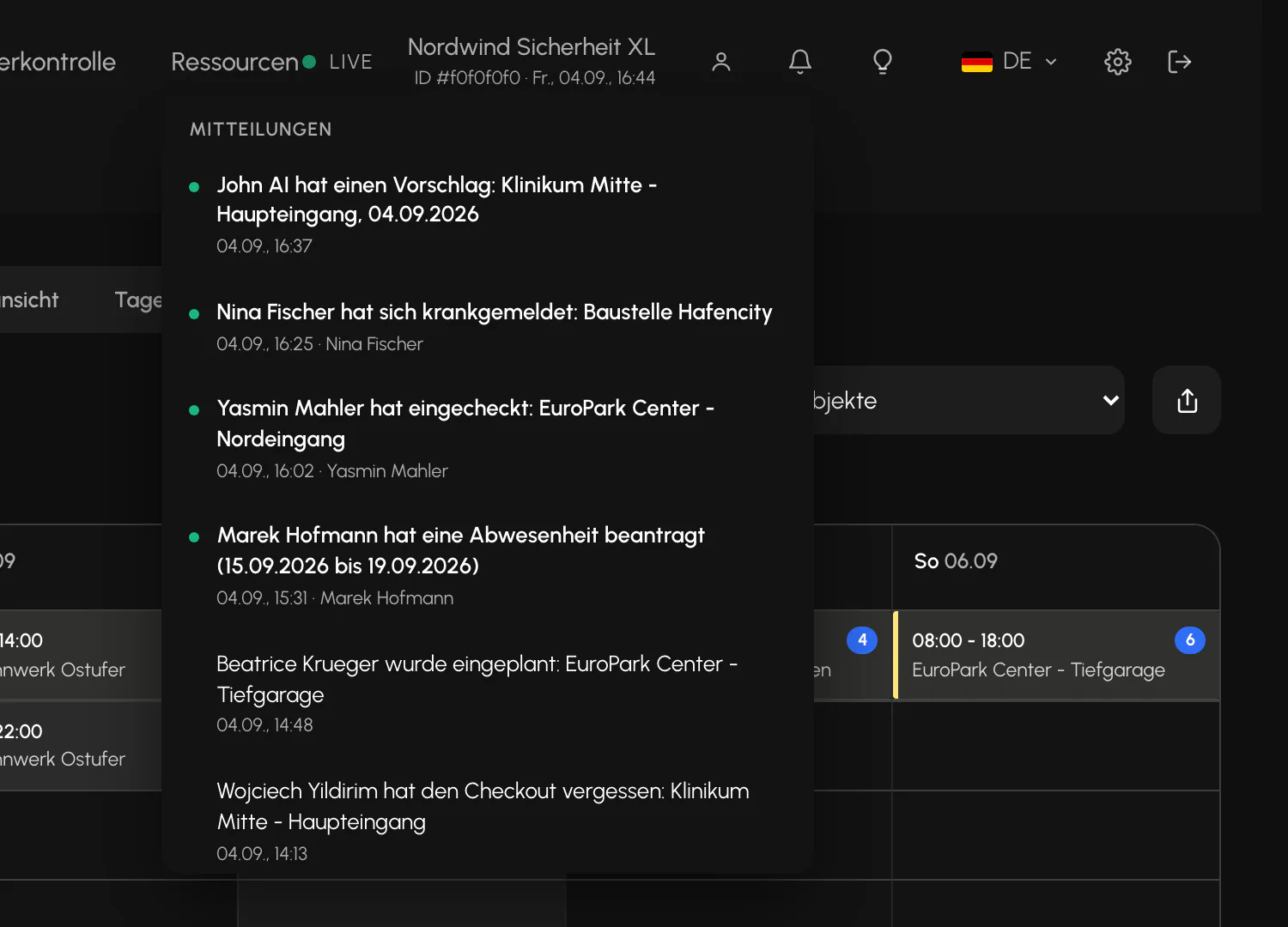
The bell in the header shows check-in and check-out events, forgotten check-outs, absence requests, sickness reports, assignments, as well as escalations and recommendations from the replacement agent.
The feed keeps itself up to date while the Cockpit is in the foreground and displays no more than 50 entries. Opening it marks everything as read, but the dots remain until it is closed so that you can still see what was new. Users do not receive a separate notification for actions they trigger themselves.
Entries older than 30 days are deleted every night. The feed therefore does not grow without limit.
Limit: The notification center is only available in the web Cockpit, not in the apps. Security officers receive push notifications, not a feed.
Related
Updated on: 03.09.2026