'%20fill='%23fff'%20fill-rule='evenodd'%20clip-rule='evenodd'%20d='M1.94516e-05%200.0202086C0.0420195%201.22421%2015.477%2022.8672%2025.974%2036.4392C80.466%20106.895%20148.48%20166.337%20231.974%20216.477C250.654%20227.694%20271.214%20239.258%20308.974%20259.785C390.041%20303.855%20418.027%20323.655%20445.375%20356.29C457.567%20370.839%20458.267%20370.657%20438.242%20358.146C387.532%20326.465%20356.693%20316.359%20305.474%20314.635C278.901%20313.741%20256.584%20316.015%20228.224%20322.508C219.385%20324.532%20216.216%20326.29%20221.407%20326.29C233.608%20326.29%20264.586%20334.87%20282.263%20343.145C295.881%20349.52%20314.974%20361.858%20314.974%20364.283C314.974%20364.695%20312.612%20365.334%20309.724%20365.703C241.199%20374.463%20154.183%20428.191%2092.562%20499.79C75.09%20520.091%2071.7%20524.859%2077.035%20521.628C78.926%20520.482%2084.728%20516.968%2089.927%20513.819C112.706%20500.021%20145.195%20487.437%20169.935%20482.828C181.824%20480.613%20205.552%20478.817%20211.298%20479.696L216.122%20480.435L203.794%20493.112C142.137%20556.516%20104.948%20625.881%2092.913%20699.925C90.533%20714.569%2090.783%20715.586%2094.806%20707.641C105.92%20685.691%20127.936%20659.716%20144.474%20649.04C150.781%20644.969%20158.103%20641.29%20159.899%20641.29C160.273%20641.29%20161.083%20648.827%20161.699%20658.04C165.47%20714.441%20188.011%20764.593%20226.674%20802.603C262.563%20837.887%20306.066%20866.035%20398.474%20913.767C434.747%20932.503%20444.973%20937.877%20458.974%20945.562C570.722%201006.9%20619.955%201060.37%20650.021%201153.06C653.459%201163.66%20656.39%201172.21%20656.535%201172.06C656.68%201171.91%20657.989%201166.17%20659.445%201159.29C682.51%201050.31%20655.152%20934.035%20584.506%20840.79C562.617%20811.9%20543.899%20791.508%20489.954%20737.79C426.931%20675.032%20411.607%20655.099%20405.006%20627.29C392.323%20573.863%20438.939%20538.423%20500.849%20554.425C526.675%20561.1%20544.604%20577.062%20549.915%20598.107L551.59%20604.743L564.032%20606.485C634.063%20616.289%20704.147%20646.368%20736.626%20680.561C749.96%20694.598%20749.787%20706.055%20736.132%20713.269L732.474%20715.202L742.766%20715.246C753.94%20715.294%20764.079%20713.573%20776.282%20709.556L784.091%20706.987L786.782%20708.95C791.451%20712.357%20797.8%20722.825%20799.144%20729.336C800.681%20736.776%20800.851%20736.757%20806.282%20728.54C830.903%20691.286%20836.954%20633.079%20820.076%20595.855L817.271%20589.667L808.372%20586.346C782.299%20576.613%20762.637%20558.586%20741.181%20524.743C729.885%20506.926%20727.08%20500.527%20723.898%20485.323C719.333%20463.505%20718.535%20461.808%20707.053%20449.509C690.138%20431.393%20684.217%20423.522%20661.746%20389.29C602.592%20299.172%20519.411%20225.38%20413.356%20168.936C385.699%20154.217%20328.981%20128.949%20327.322%20130.609C327.135%20130.796%20332.883%20134.879%20340.096%20139.682C394.802%20176.112%20443.502%20218.504%20467.755%20250.806C475.015%20260.475%20485.69%20277.926%20484.843%20278.74C484.64%20278.936%20480.199%20275.945%20474.974%20272.096C430.93%20239.644%20400.199%20223.792%20315.974%20190.078C174.722%20133.537%20108.045%2094.3042%2016.767%2014.0202C7.53105%205.89621%20-0.0139805%20-0.403791%201.94516e-05%200.0202086ZM592.467%20436.927C603.971%20451.343%20612.149%20463.814%20615.502%20472.054C626.595%20499.317%20631.458%20503.825%20657.974%20511.427C664.299%20513.24%20674.182%20517.081%20679.937%20519.961C685.691%20522.842%20690.502%20525.096%20690.627%20524.971C690.752%20524.845%20688.519%20521.149%20685.664%20516.757C682.81%20512.364%20678.077%20504.207%20675.147%20498.629C668.633%20486.227%20664.825%20482.16%20649.462%20471.196C634.986%20460.866%20585.876%20426.936%20584.662%20426.427C584.187%20426.228%20587.699%20430.953%20592.467%20436.927Z'/%3e%3c/svg%3e)
John AI, the Replacement Agent
Finds replacements for uncovered shifts and contacts security officers in stages. Completely disabled by default.
Requirements
- Activation by us as the operator, after a Betriebsvereinbarung, meaning a works agreement, and an Auftragsverarbeitungsvertrag, meaning a data processing agreement
- Consent from each security officer for each channel
Activate first, then expect results
This is the point that causes most questions: the button is there, but nothing happens without activation. The agent is fully built but locked at several levels.
- We set the tenant approval as the operator. It is not a self-service setting. A Betriebsvereinbarung, meaning a works agreement, and an Auftragsverarbeitungsvertrag, meaning a data processing agreement, are required.
- WhatsApp and push each require a configured delivery channel.
As long as any of these are missing, the section is visible but has no effect. Contact us if you want to use it.
Cases
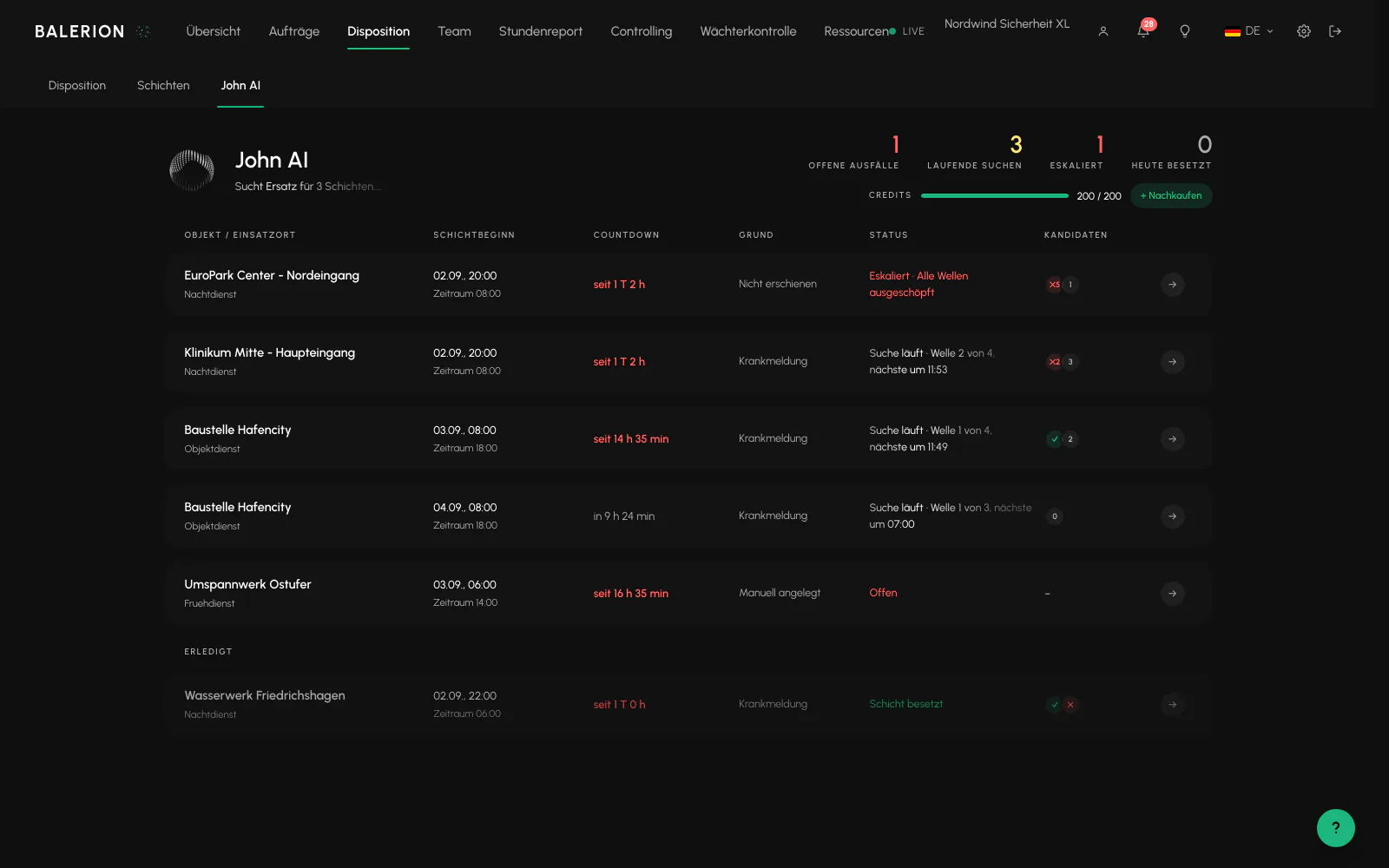
A case is an absence that requires a replacement. It is created after a sickness report or created manually. The overview shows open absences, active searches, escalated cases and cases filled today. Each row includes the site, shift start, countdown, reason, status and number of candidates.
How the search works
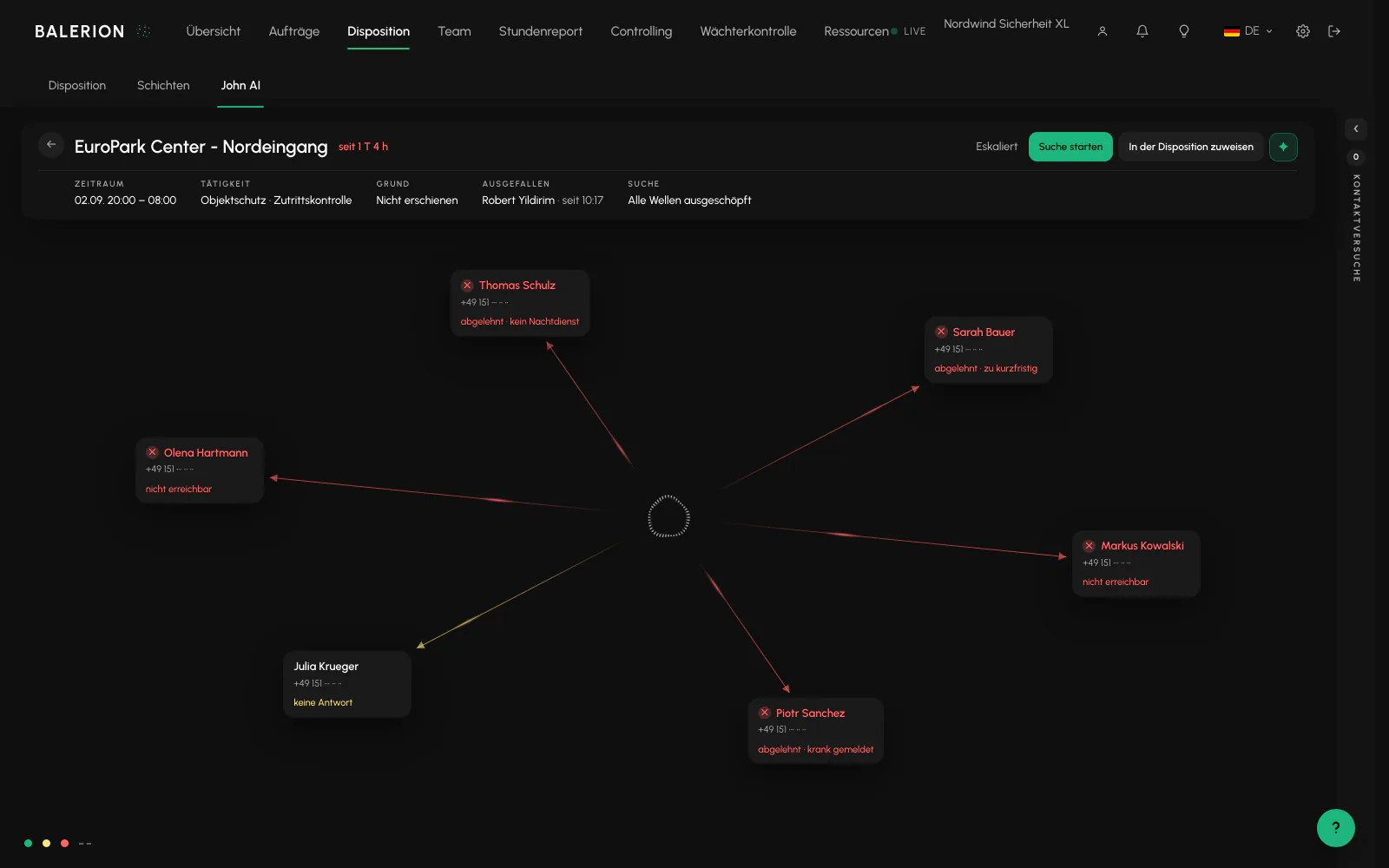
A search contacts several suitable security officers at the same time and expands the group step by step until someone accepts or the group is exhausted.
Security officers who have already been contacted are never contacted again. If there are no candidates from the start, the case is escalated immediately instead of running without effect.
If the search finds no one, a notification asks the planners to take over. The case remains open until a person decides.
We configure the scope and cadence of the search with you during activation.
Contact window
Contacts are made only within a defined time window each day. The window is binding. Anything due outside the window is moved to the start of the window, not skipped. No one is called at night because a search happens to be due then.
The only way around this is your own "Continue searching, now" action. The automated process never overrides the window. We define the window with you during activation.
Channels and consent
Security officers are contacted through the channels to which they have consented, in stages from the least intrusive to the most direct contact.
Each security officer decides for each channel whether they may be contacted in this way. No one can give this consent on their behalf. There is deliberately no setting for it in the Cockpit. If consent is missing, the agent skips the channel and records this as a separate entry in the timeline. Anyone wondering why certain people are never called can find the answer there.
What the call assistant says and does not say
At the start, it explicitly identifies itself as a virtual assistant. This is a requirement of the KI-Verordnung, meaning AI regulation, and cannot be disabled.
It offers exactly one shift and can do four things: accept, decline, escalate to the scheduling team and look up an answer to a factual question. It makes no commitments about pay, swaps or other shifts. There are fixed responses and an escalation for those topics.
An acceptance is also checked again on the server before it is booked. If the last statement is not an unambiguous acceptance, the assistant asks for clarification instead of booking.
There is no audio recording. The system stores the time, result, a truncated response text and the call duration.
Approval levels
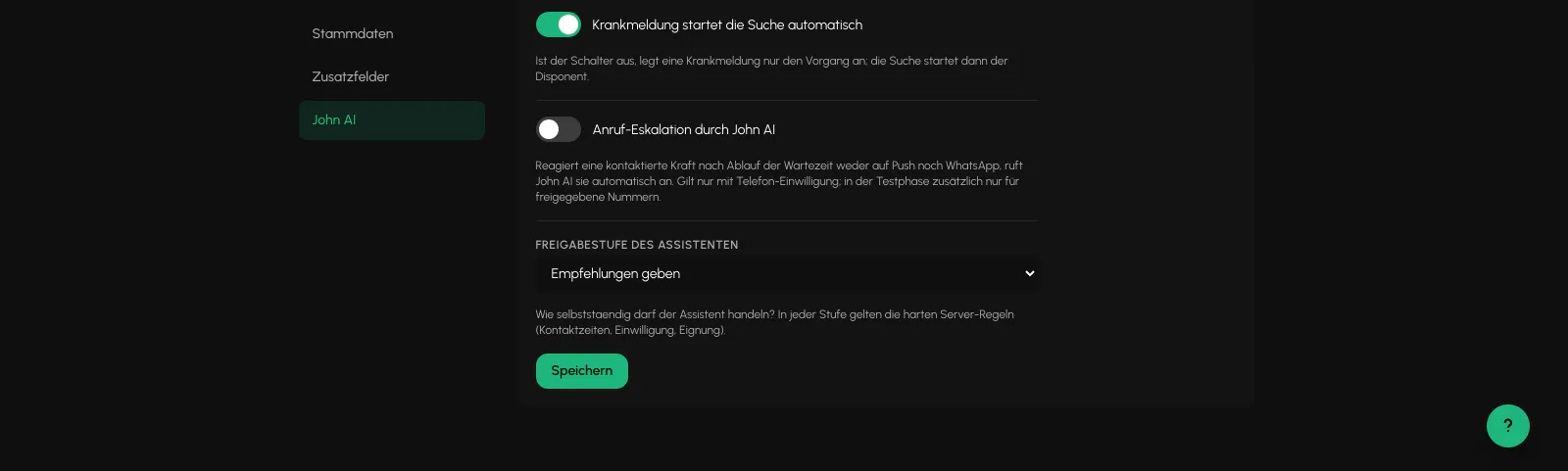
There are four configurable levels: analyze only, provide recommendations, prepare actions and have a person confirm them, or act independently. At every level, the strict server rules for contact times, consent and suitability remain unchanged.
Credits
The agent has a built-in spending block. A push notification costs nothing, a WhatsApp message costs one credit, a call costs ten and an analysis run costs one. 200 credits are included per month, and additional credits can be purchased in packages.
If the allowance is empty, the call fails with a notice instead of silently not taking place. A warning appears in the bell when 20 percent remains.
Related
- Absence and ReplacementA sickness report starts a process, not automatic replanning. The scheduling team retains the decision.
- NotificationsEleven triggers, each in 15 languages, plus a feed in the Cockpit.
- Security and Data ProtectionWhat is enforced technically, where data is generated, and how long it is retained.
Updated on: 03.09.2026