'%20fill='%23fff'%20fill-rule='evenodd'%20clip-rule='evenodd'%20d='M1.94516e-05%200.0202086C0.0420195%201.22421%2015.477%2022.8672%2025.974%2036.4392C80.466%20106.895%20148.48%20166.337%20231.974%20216.477C250.654%20227.694%20271.214%20239.258%20308.974%20259.785C390.041%20303.855%20418.027%20323.655%20445.375%20356.29C457.567%20370.839%20458.267%20370.657%20438.242%20358.146C387.532%20326.465%20356.693%20316.359%20305.474%20314.635C278.901%20313.741%20256.584%20316.015%20228.224%20322.508C219.385%20324.532%20216.216%20326.29%20221.407%20326.29C233.608%20326.29%20264.586%20334.87%20282.263%20343.145C295.881%20349.52%20314.974%20361.858%20314.974%20364.283C314.974%20364.695%20312.612%20365.334%20309.724%20365.703C241.199%20374.463%20154.183%20428.191%2092.562%20499.79C75.09%20520.091%2071.7%20524.859%2077.035%20521.628C78.926%20520.482%2084.728%20516.968%2089.927%20513.819C112.706%20500.021%20145.195%20487.437%20169.935%20482.828C181.824%20480.613%20205.552%20478.817%20211.298%20479.696L216.122%20480.435L203.794%20493.112C142.137%20556.516%20104.948%20625.881%2092.913%20699.925C90.533%20714.569%2090.783%20715.586%2094.806%20707.641C105.92%20685.691%20127.936%20659.716%20144.474%20649.04C150.781%20644.969%20158.103%20641.29%20159.899%20641.29C160.273%20641.29%20161.083%20648.827%20161.699%20658.04C165.47%20714.441%20188.011%20764.593%20226.674%20802.603C262.563%20837.887%20306.066%20866.035%20398.474%20913.767C434.747%20932.503%20444.973%20937.877%20458.974%20945.562C570.722%201006.9%20619.955%201060.37%20650.021%201153.06C653.459%201163.66%20656.39%201172.21%20656.535%201172.06C656.68%201171.91%20657.989%201166.17%20659.445%201159.29C682.51%201050.31%20655.152%20934.035%20584.506%20840.79C562.617%20811.9%20543.899%20791.508%20489.954%20737.79C426.931%20675.032%20411.607%20655.099%20405.006%20627.29C392.323%20573.863%20438.939%20538.423%20500.849%20554.425C526.675%20561.1%20544.604%20577.062%20549.915%20598.107L551.59%20604.743L564.032%20606.485C634.063%20616.289%20704.147%20646.368%20736.626%20680.561C749.96%20694.598%20749.787%20706.055%20736.132%20713.269L732.474%20715.202L742.766%20715.246C753.94%20715.294%20764.079%20713.573%20776.282%20709.556L784.091%20706.987L786.782%20708.95C791.451%20712.357%20797.8%20722.825%20799.144%20729.336C800.681%20736.776%20800.851%20736.757%20806.282%20728.54C830.903%20691.286%20836.954%20633.079%20820.076%20595.855L817.271%20589.667L808.372%20586.346C782.299%20576.613%20762.637%20558.586%20741.181%20524.743C729.885%20506.926%20727.08%20500.527%20723.898%20485.323C719.333%20463.505%20718.535%20461.808%20707.053%20449.509C690.138%20431.393%20684.217%20423.522%20661.746%20389.29C602.592%20299.172%20519.411%20225.38%20413.356%20168.936C385.699%20154.217%20328.981%20128.949%20327.322%20130.609C327.135%20130.796%20332.883%20134.879%20340.096%20139.682C394.802%20176.112%20443.502%20218.504%20467.755%20250.806C475.015%20260.475%20485.69%20277.926%20484.843%20278.74C484.64%20278.936%20480.199%20275.945%20474.974%20272.096C430.93%20239.644%20400.199%20223.792%20315.974%20190.078C174.722%20133.537%20108.045%2094.3042%2016.767%2014.0202C7.53105%205.89621%20-0.0139805%20-0.403791%201.94516e-05%200.0202086ZM592.467%20436.927C603.971%20451.343%20612.149%20463.814%20615.502%20472.054C626.595%20499.317%20631.458%20503.825%20657.974%20511.427C664.299%20513.24%20674.182%20517.081%20679.937%20519.961C685.691%20522.842%20690.502%20525.096%20690.627%20524.971C690.752%20524.845%20688.519%20521.149%20685.664%20516.757C682.81%20512.364%20678.077%20504.207%20675.147%20498.629C668.633%20486.227%20664.825%20482.16%20649.462%20471.196C634.986%20460.866%20585.876%20426.936%20584.662%20426.427C584.187%20426.228%20587.699%20430.953%20592.467%20436.927Z'/%3e%3c/svg%3e)
Guard Patrols
Checkpoints at the site, patrols in the app, and evidence in the Cockpit. This also includes an honest explanation of what a scan proves.
Requirements
- Site created
- Security officer assigned to a shift at this site
- Security officer checked in, otherwise the patrol does not appear in the app
Creating checkpoints
For each site, you create checkpoints with a name and type, either QR or NFC. The Cockpit prints the QR labels as a PDF, two per row, and can write directly to NFC tags in the browser.
Writing to NFC tags from the Cockpit only works in Chrome on Android. This is a limitation of the browser interface.
A checkpoint has no coordinates of its own and no secret. The tag only contains its identifier.
Scanning in the app
From the shift details, the checked-in security officer opens "Patrol / Check". It includes a full-screen scanner that remains open for multiple scans and a button for manual capture at each checkpoint. Progress appears as "x of y".
An accidental duplicate scan is detected. One tap produces exactly one entry.
The server always determines the assignment itself: the security officer's own assignment, status checked in, and a site matching the checkpoint's site. A checkpoint from another site is rejected. Entries can only be created, not changed or deleted. Every scan is included in the audit log.
Platform: QR and manual capture on iPhone and Android. NFC only on the iPhone.
What a scan proves and what it does not
This is the most important part of this chapter, so it is stated explicitly: a patrol scan is evidence of presence and process, not a tamper-proof seal. It proves that a security officer checked in at this site captured the checkpoint, including the order and times in which this happened.
Protection comes from binding the scan to the assignment: the security officer must be checked in at this exact site at the time of the scan. A checkpoint from another site is rejected. Every scan remains unchanged in the report, and entries cannot be changed or deleted.
In practice, this means: If you use the patrol as evidence of a contractually agreed service, combine it with time tracking and spot-check supervisory patrols. Reading more into the scan alone overestimates it.
Patrol plans
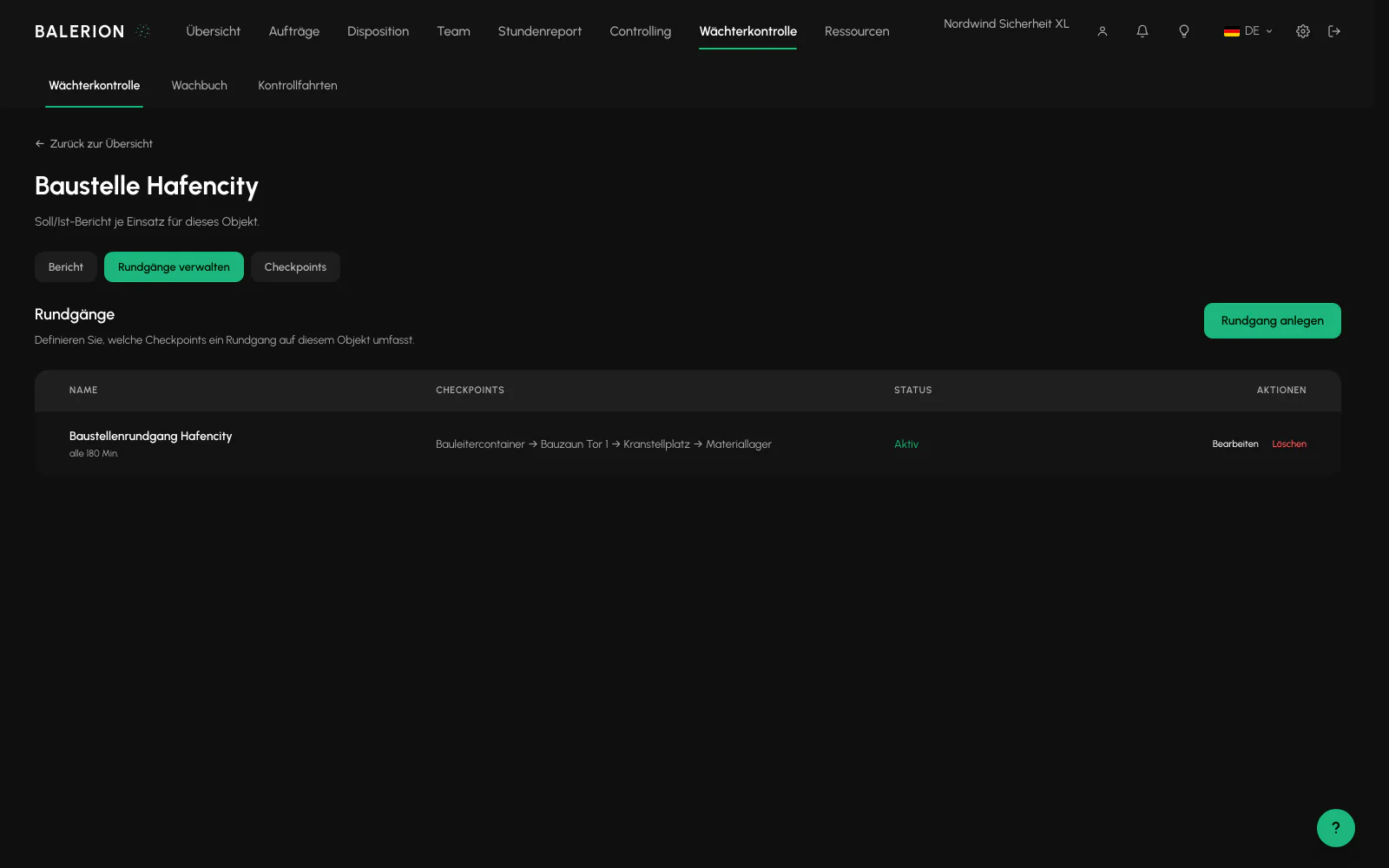
One plan per site contains an ordered list of checkpoints and, optionally, a repeat interval in minutes and fixed times. Both can be combined. A patrol becomes due as soon as either condition applies.
The interval is at least 5 minutes. A patrol is never due immediately, only at the first full interval. A due patrol is reported promptly, not at the exact minute.
New plans are active, but the interval and fixed times are empty, so initially there are no reminders. There is no tolerance or grace period.
Planned vs actual report and alert
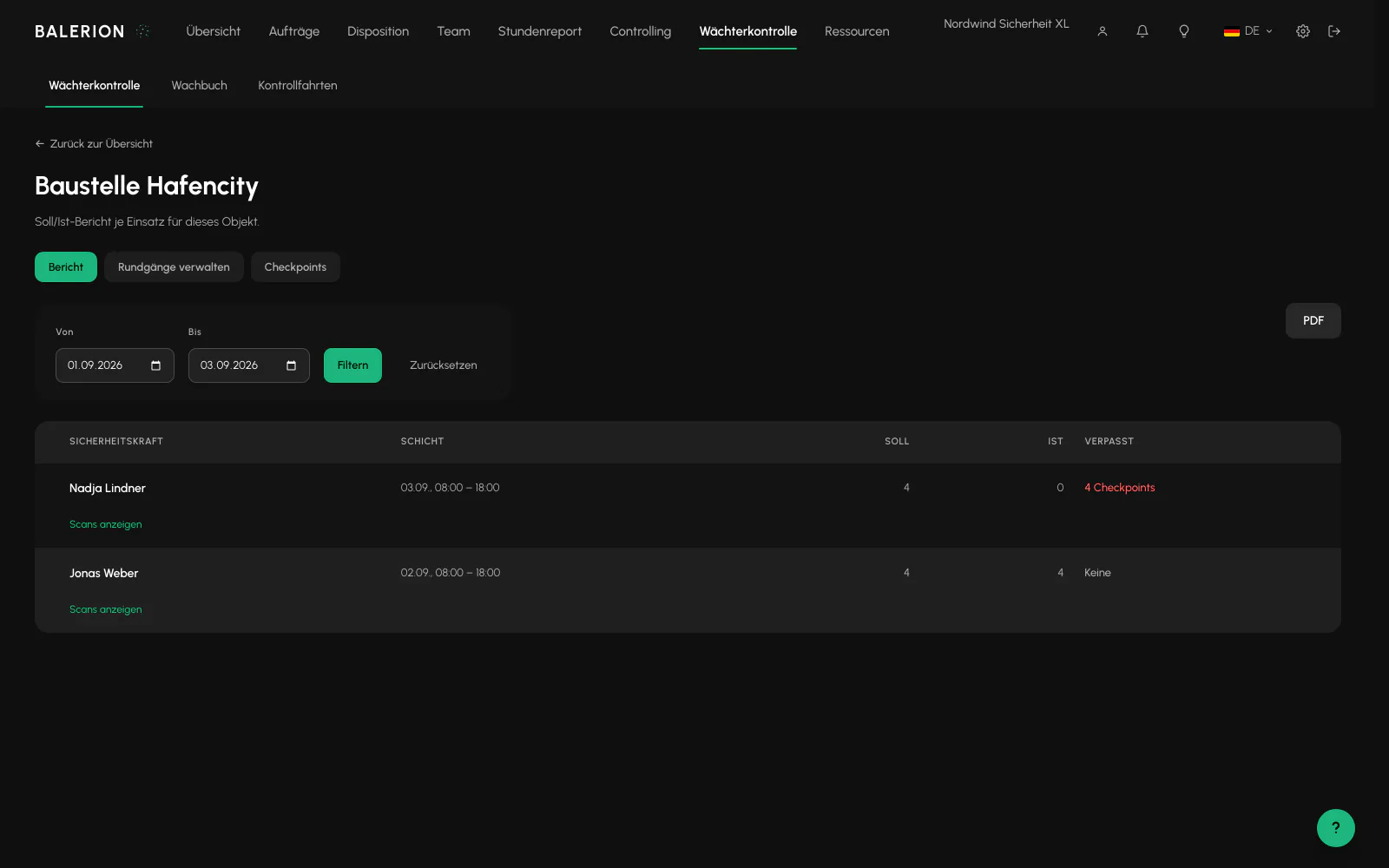
For each site, a traffic light shows the status. Behind it, each assignment displays "scanned of planned" with the time window and missing checkpoints.
The target includes all checkpoints from active plans that existed before the shift started. A plan created later therefore does not make old assignments look incomplete retroactively. Missing checkpoints are only shown after the shift is completed.
After the shift ends, a background process checks every worked assignment. If checkpoints are missing, the scheduling team receives the "Patrol missed" notification exactly once per assignment.
The mobile manager view for this is currently only available on the iPhone.
Access for customers
For each site, you can allow the customer to view the patrol report and create checkpoints. This is off by default.
Enabling access alone is not enough. The customer must also be linked to the site through an order or directly. Changing and deleting checkpoints and the QR PDF remain with the security company.
Related
- Digital Guard LogbookSeven entry types, optional photos, and no option to change anything afterward. This is precisely what makes it useful as evidence.
- The App for Security OfficersFive tabs, no password, and everything a security officer needs while on duty.
- Time TrackingSecurity officers clock in and out in the app, not in the Cockpit. The server checks the location and records the timestamp.
Updated on: 03.09.2026