'%20fill='%23fff'%20fill-rule='evenodd'%20clip-rule='evenodd'%20d='M1.94516e-05%200.0202086C0.0420195%201.22421%2015.477%2022.8672%2025.974%2036.4392C80.466%20106.895%20148.48%20166.337%20231.974%20216.477C250.654%20227.694%20271.214%20239.258%20308.974%20259.785C390.041%20303.855%20418.027%20323.655%20445.375%20356.29C457.567%20370.839%20458.267%20370.657%20438.242%20358.146C387.532%20326.465%20356.693%20316.359%20305.474%20314.635C278.901%20313.741%20256.584%20316.015%20228.224%20322.508C219.385%20324.532%20216.216%20326.29%20221.407%20326.29C233.608%20326.29%20264.586%20334.87%20282.263%20343.145C295.881%20349.52%20314.974%20361.858%20314.974%20364.283C314.974%20364.695%20312.612%20365.334%20309.724%20365.703C241.199%20374.463%20154.183%20428.191%2092.562%20499.79C75.09%20520.091%2071.7%20524.859%2077.035%20521.628C78.926%20520.482%2084.728%20516.968%2089.927%20513.819C112.706%20500.021%20145.195%20487.437%20169.935%20482.828C181.824%20480.613%20205.552%20478.817%20211.298%20479.696L216.122%20480.435L203.794%20493.112C142.137%20556.516%20104.948%20625.881%2092.913%20699.925C90.533%20714.569%2090.783%20715.586%2094.806%20707.641C105.92%20685.691%20127.936%20659.716%20144.474%20649.04C150.781%20644.969%20158.103%20641.29%20159.899%20641.29C160.273%20641.29%20161.083%20648.827%20161.699%20658.04C165.47%20714.441%20188.011%20764.593%20226.674%20802.603C262.563%20837.887%20306.066%20866.035%20398.474%20913.767C434.747%20932.503%20444.973%20937.877%20458.974%20945.562C570.722%201006.9%20619.955%201060.37%20650.021%201153.06C653.459%201163.66%20656.39%201172.21%20656.535%201172.06C656.68%201171.91%20657.989%201166.17%20659.445%201159.29C682.51%201050.31%20655.152%20934.035%20584.506%20840.79C562.617%20811.9%20543.899%20791.508%20489.954%20737.79C426.931%20675.032%20411.607%20655.099%20405.006%20627.29C392.323%20573.863%20438.939%20538.423%20500.849%20554.425C526.675%20561.1%20544.604%20577.062%20549.915%20598.107L551.59%20604.743L564.032%20606.485C634.063%20616.289%20704.147%20646.368%20736.626%20680.561C749.96%20694.598%20749.787%20706.055%20736.132%20713.269L732.474%20715.202L742.766%20715.246C753.94%20715.294%20764.079%20713.573%20776.282%20709.556L784.091%20706.987L786.782%20708.95C791.451%20712.357%20797.8%20722.825%20799.144%20729.336C800.681%20736.776%20800.851%20736.757%20806.282%20728.54C830.903%20691.286%20836.954%20633.079%20820.076%20595.855L817.271%20589.667L808.372%20586.346C782.299%20576.613%20762.637%20558.586%20741.181%20524.743C729.885%20506.926%20727.08%20500.527%20723.898%20485.323C719.333%20463.505%20718.535%20461.808%20707.053%20449.509C690.138%20431.393%20684.217%20423.522%20661.746%20389.29C602.592%20299.172%20519.411%20225.38%20413.356%20168.936C385.699%20154.217%20328.981%20128.949%20327.322%20130.609C327.135%20130.796%20332.883%20134.879%20340.096%20139.682C394.802%20176.112%20443.502%20218.504%20467.755%20250.806C475.015%20260.475%20485.69%20277.926%20484.843%20278.74C484.64%20278.936%20480.199%20275.945%20474.974%20272.096C430.93%20239.644%20400.199%20223.792%20315.974%20190.078C174.722%20133.537%20108.045%2094.3042%2016.767%2014.0202C7.53105%205.89621%20-0.0139805%20-0.403791%201.94516e-05%200.0202086ZM592.467%20436.927C603.971%20451.343%20612.149%20463.814%20615.502%20472.054C626.595%20499.317%20631.458%20503.825%20657.974%20511.427C664.299%20513.24%20674.182%20517.081%20679.937%20519.961C685.691%20522.842%20690.502%20525.096%20690.627%20524.971C690.752%20524.845%20688.519%20521.149%20685.664%20516.757C682.81%20512.364%20678.077%20504.207%20675.147%20498.629C668.633%20486.227%20664.825%20482.16%20649.462%20471.196C634.986%20460.866%20585.876%20426.936%20584.662%20426.427C584.187%20426.228%20587.699%20430.953%20592.467%20436.927Z'/%3e%3c/svg%3e)
E-Invoice, XRechnung
Issue invoices in XRechnung format, individually as a download or automatically when sending.
Requirements
- Complete invoice details for your own company in the settings
- Complete invoice details for the customer
- Invoice is approved, a draft is not sufficient
Download individually
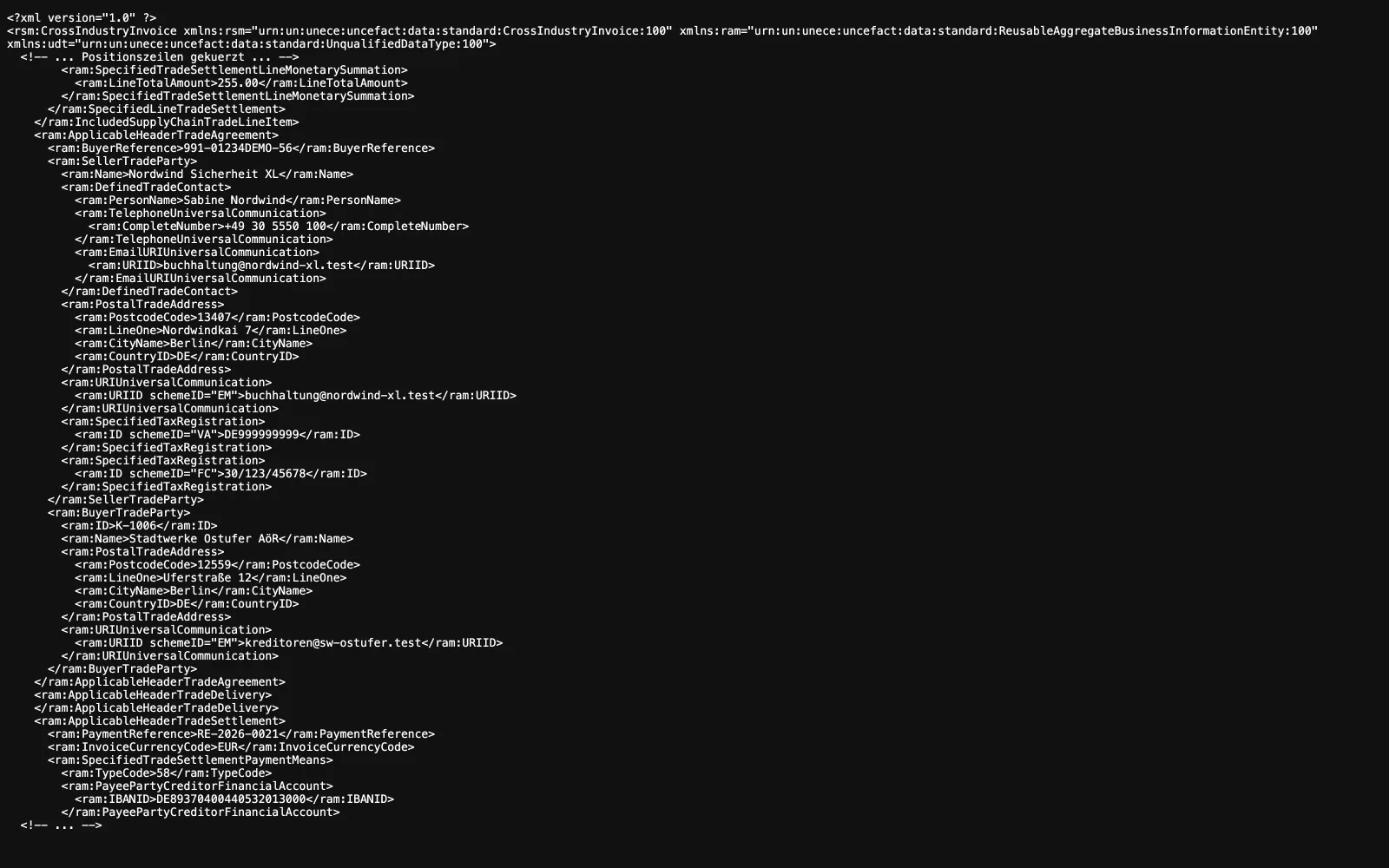
In the invoice list, every approved invoice has an "XRechnung XML" button. The file is created again from the current master data each time it is requested. It is not saved.
A credit note is correctly identified as such and refers to the number of the original invoice.
Attach automatically when sending
The customer record has an "Electronic invoice" section with the "Attach XRechnung when sending" switch and the "Leitweg-ID" field. If the switch is on, the XML file is sent with the invoice email in addition to the PDF.
If required information is missing, sending is canceled and no email is sent. The invoice remains approved, and the message lists the missing fields. This is intentional: it is better not to send anything than to send an unusable file.
Both edit forms show in advance what is still missing, the customer form below the switch and the settings under "Still required for XRechnung".
Which information is required
From your company: VAT identification number or tax number, either one is sufficient, plus street, postal code, city, country, a contact person with phone number and email address, and the IBAN. The BIC is optional.
From the customer: Street, postal code, city, country, and email address.
Leitweg-ID
Public contracting authorities in Germany need a Leitweg-ID so that the invoice reaches the correct department. It is stored in the customer record.
Important: Technically, the field is not required. If it is missing, the file silently falls back to the customer number and is still created. It is then formally valid, but cannot be delivered to a public authority in practice. Anyone invoicing public contracting authorities should therefore always maintain the Leitweg-ID.
Format limitations
To avoid surprises, here are three points stated plainly:
- There is no ZUGFeRD. A separate XML file is created alongside the PDF, never a PDF with embedded XML.
- Only one tax rate per invoice. The XML file represents exactly one rate. Invoicing itself supports items with 19, 7, and 0 percent as well as discounts. Invoices with mixed rates or discounts therefore do not fit cleanly into the XML and should not be sent as XRechnung.
- The payment method is always bank transfer with your IBAN in the document, even if direct debit is stored for the customer.
Related
- Invoicing and ControllingReviewed hours become a draft invoice. Which hourly rate applies depends on where you maintained it.
- Price IncreaseRaise hourly rates for many customers at once, by a percentage or a fixed surcharge. Calculate first, then execute.
- Orders and SitesThe order generates the shifts. The site provides the geofence, contacts and prices.
Updated on: 03.09.2026