'%20fill='%23fff'%20fill-rule='evenodd'%20clip-rule='evenodd'%20d='M1.94516e-05%200.0202086C0.0420195%201.22421%2015.477%2022.8672%2025.974%2036.4392C80.466%20106.895%20148.48%20166.337%20231.974%20216.477C250.654%20227.694%20271.214%20239.258%20308.974%20259.785C390.041%20303.855%20418.027%20323.655%20445.375%20356.29C457.567%20370.839%20458.267%20370.657%20438.242%20358.146C387.532%20326.465%20356.693%20316.359%20305.474%20314.635C278.901%20313.741%20256.584%20316.015%20228.224%20322.508C219.385%20324.532%20216.216%20326.29%20221.407%20326.29C233.608%20326.29%20264.586%20334.87%20282.263%20343.145C295.881%20349.52%20314.974%20361.858%20314.974%20364.283C314.974%20364.695%20312.612%20365.334%20309.724%20365.703C241.199%20374.463%20154.183%20428.191%2092.562%20499.79C75.09%20520.091%2071.7%20524.859%2077.035%20521.628C78.926%20520.482%2084.728%20516.968%2089.927%20513.819C112.706%20500.021%20145.195%20487.437%20169.935%20482.828C181.824%20480.613%20205.552%20478.817%20211.298%20479.696L216.122%20480.435L203.794%20493.112C142.137%20556.516%20104.948%20625.881%2092.913%20699.925C90.533%20714.569%2090.783%20715.586%2094.806%20707.641C105.92%20685.691%20127.936%20659.716%20144.474%20649.04C150.781%20644.969%20158.103%20641.29%20159.899%20641.29C160.273%20641.29%20161.083%20648.827%20161.699%20658.04C165.47%20714.441%20188.011%20764.593%20226.674%20802.603C262.563%20837.887%20306.066%20866.035%20398.474%20913.767C434.747%20932.503%20444.973%20937.877%20458.974%20945.562C570.722%201006.9%20619.955%201060.37%20650.021%201153.06C653.459%201163.66%20656.39%201172.21%20656.535%201172.06C656.68%201171.91%20657.989%201166.17%20659.445%201159.29C682.51%201050.31%20655.152%20934.035%20584.506%20840.79C562.617%20811.9%20543.899%20791.508%20489.954%20737.79C426.931%20675.032%20411.607%20655.099%20405.006%20627.29C392.323%20573.863%20438.939%20538.423%20500.849%20554.425C526.675%20561.1%20544.604%20577.062%20549.915%20598.107L551.59%20604.743L564.032%20606.485C634.063%20616.289%20704.147%20646.368%20736.626%20680.561C749.96%20694.598%20749.787%20706.055%20736.132%20713.269L732.474%20715.202L742.766%20715.246C753.94%20715.294%20764.079%20713.573%20776.282%20709.556L784.091%20706.987L786.782%20708.95C791.451%20712.357%20797.8%20722.825%20799.144%20729.336C800.681%20736.776%20800.851%20736.757%20806.282%20728.54C830.903%20691.286%20836.954%20633.079%20820.076%20595.855L817.271%20589.667L808.372%20586.346C782.299%20576.613%20762.637%20558.586%20741.181%20524.743C729.885%20506.926%20727.08%20500.527%20723.898%20485.323C719.333%20463.505%20718.535%20461.808%20707.053%20449.509C690.138%20431.393%20684.217%20423.522%20661.746%20389.29C602.592%20299.172%20519.411%20225.38%20413.356%20168.936C385.699%20154.217%20328.981%20128.949%20327.322%20130.609C327.135%20130.796%20332.883%20134.879%20340.096%20139.682C394.802%20176.112%20443.502%20218.504%20467.755%20250.806C475.015%20260.475%20485.69%20277.926%20484.843%20278.74C484.64%20278.936%20480.199%20275.945%20474.974%20272.096C430.93%20239.644%20400.199%20223.792%20315.974%20190.078C174.722%20133.537%20108.045%2094.3042%2016.767%2014.0202C7.53105%205.89621%20-0.0139805%20-0.403791%201.94516e-05%200.0202086ZM592.467%20436.927C603.971%20451.343%20612.149%20463.814%20615.502%20472.054C626.595%20499.317%20631.458%20503.825%20657.974%20511.427C664.299%20513.24%20674.182%20517.081%20679.937%20519.961C685.691%20522.842%20690.502%20525.096%20690.627%20524.971C690.752%20524.845%20688.519%20521.149%20685.664%20516.757C682.81%20512.364%20678.077%20504.207%20675.147%20498.629C668.633%20486.227%20664.825%20482.16%20649.462%20471.196C634.986%20460.866%20585.876%20426.936%20584.662%20426.427C584.187%20426.228%20587.699%20430.953%20592.467%20436.927Z'/%3e%3c/svg%3e)
Invoicing and Controlling
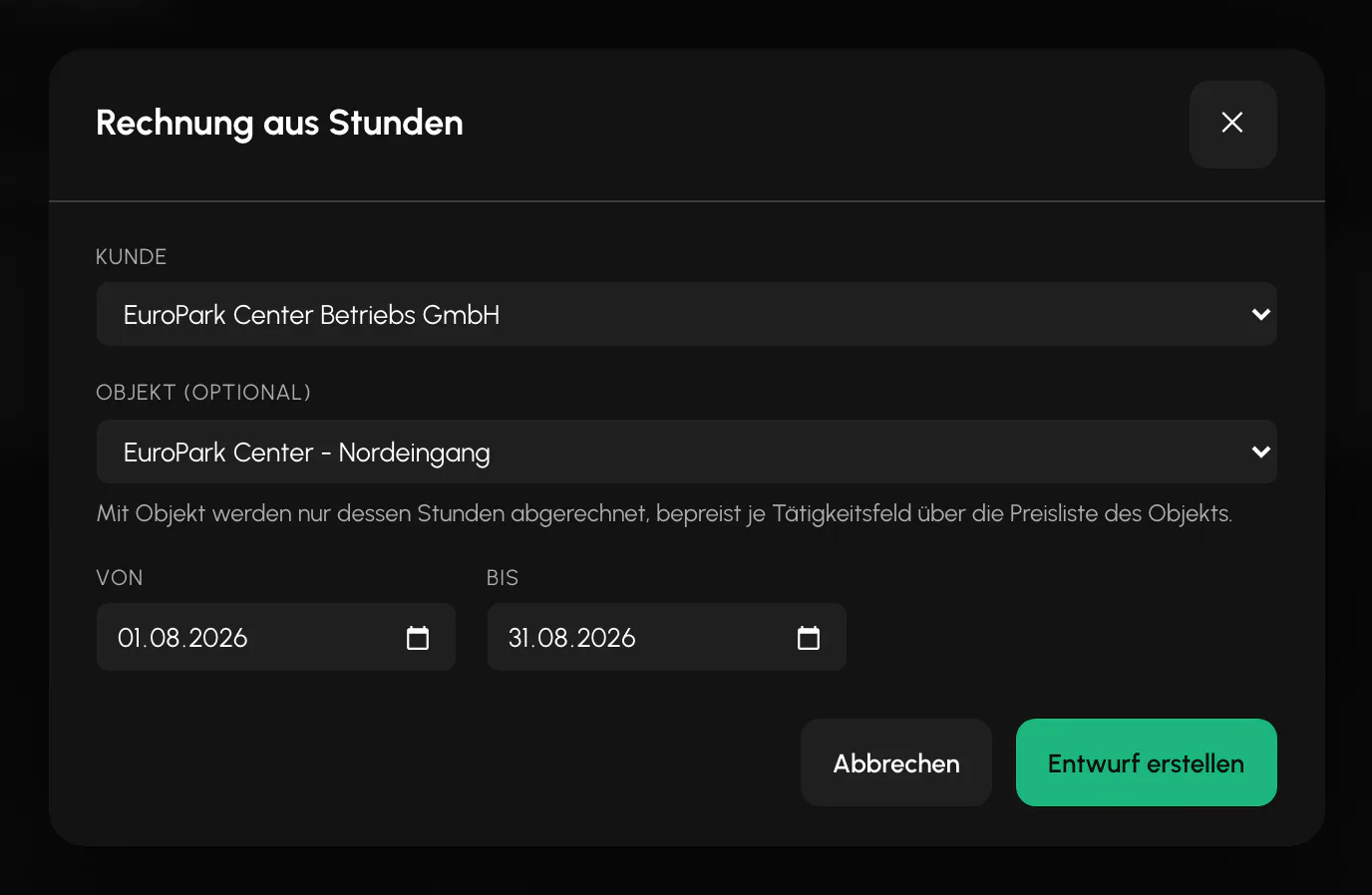
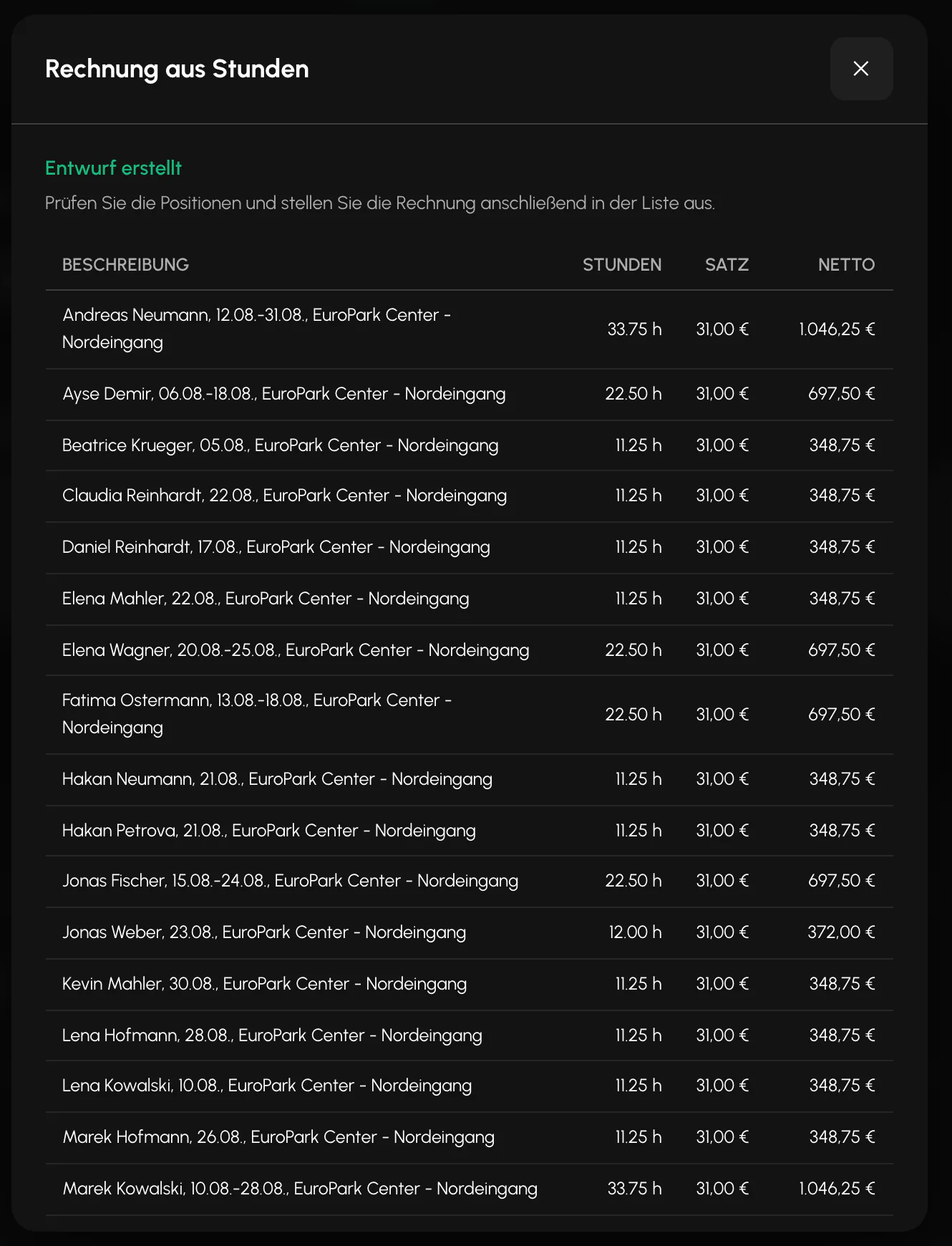
Reviewed hours become a draft invoice. Which hourly rate applies depends on where you maintained it.
Requirements
- Customer and site created
- Hourly rate maintained at at least one level
- Hours reviewed in the hours report
Which hourly rate applies
An hourly rate can be maintained at several levels: at the site, in a price list for the customer, in a deal, on the order and as the customer's standard rate. The most specific maintained rate always applies. The site rate takes precedence over the price list, which takes precedence over the order rate. The standard rate applies last.
A deal is a pricing model by employee category that can be assigned to several customers at the same time. If it contains a daily flat rate for a category, that rate replaces hourly and premium items instead of being added to them.
If a price is unexpected: The reason is almost always a rate at a more specific level that has been forgotten. Start searching at the site and work outward.
If every rate is missing, the draft stops with a notice instead of silently calculating with zero euros.
Note the difference from payroll: On the invoice, each minute receives exactly one premium. The higher-value premium wins. In payroll, premiums stack because § 3b EStG permits this. Therefore, never compare a premium column on the invoice with one in payroll.
Quantity, totals and tax
The quantity is the counted time, meaning planned time plus approved overtime. The "reconciled hours only" filter is off by default, so unreviewed time can also be invoiced.
Generated invoices use a fixed 19 percent and a payment term of 14 days. For manually created invoices, 19, 7 and 0 percent can be selected.
The invoice number follows the pattern of prefix, year and sequential number, and is assigned without gaps. Credit notes use the same number sequence.
Status, credit note and dunning
The sequence is draft, approved, sent, open, paid, canceled. Each step checks the previous status. A sent invoice can no longer be edited.
A credit note negates the line items, sets itself to open and sets the original invoice to canceled, all in one step.
The dunning process runs automatically once every morning, with levels starting after 1 day, 14 days and 28 days overdue. No further reminders are sent after level 3.
DATEV invoice export
Sent, open and paid invoices, as well as all credit notes, are exported and filtered by invoice date. If no period is specified, the current month is used.
The Account, Contra account and Tax key columns are deliberately left empty because no chart of accounts for the entire tenant is stored. A guessed default value would create an incorrect posting.
SEPA direct debit
If you collect payments from customers by direct debit, Balerion Security creates the bank file in pain.008 format.
Three things are required: your creditor identifier together with IBAN and BIC in the settings, the Direct debit payment method with mandate reference, signature date and IBAN for the customer, and at least one matching invoice. The Invoice payment method is preset for customers, so Direct debit must be selected deliberately.
The file is created from the invoice list, either from the checked selection or by using a due date cutoff. It only contains invoices with approved or sent status, without a payment date, from direct debit customers. Credit notes are excluded.
If information is missing, the message names the missing fields precisely instead of creating an incomplete file. The due date in the file is two calendar days in the future.
The export changes nothing. Invoice status and payment date remain unchanged. Recording the payment works as before.
Note on the quotation
Quotations have a free-form note field. It can be edited in the draft, appears in the quotation row and in the quotation PDF below the validity line. Invoices are not affected.
Controlling
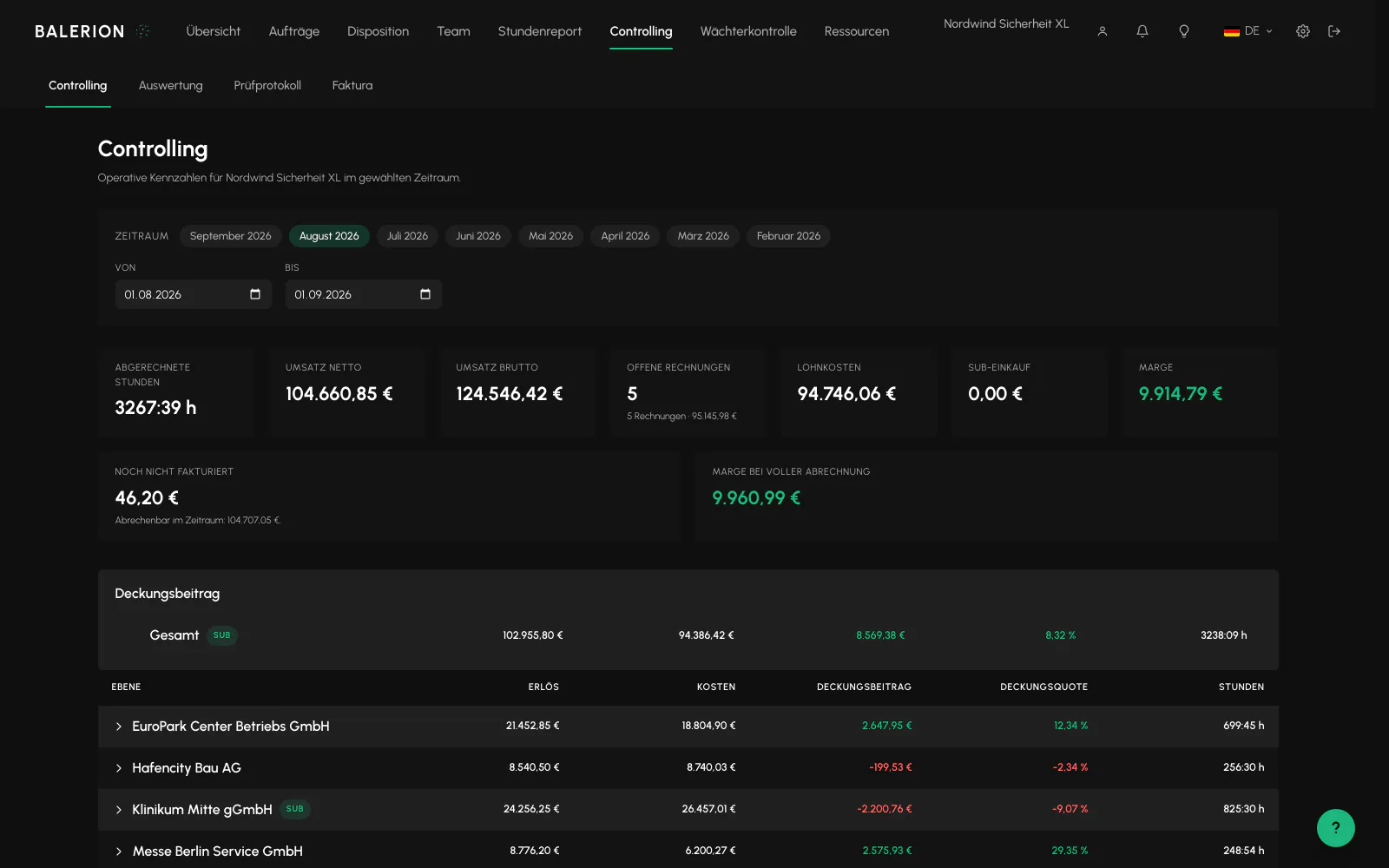
The metric tiles for the selected period are at the top, followed by the contribution margin with drilldown and then the three detailed reports: revenue by customer, hours by site and employee activity. The detailed reports share a switcher, so exactly one is visible at a time. Each has its own CSV export. The browser remembers the most recently selected view.
The company-wide margin in the tiles is revenue minus payroll costs minus purchased subcontracted services. It is explicitly indicative. Fixed costs, taxes and depreciation are not included.
The "Not yet invoiced" tile shows the billable time in the period for which no invoice exists yet. If more time has been invoiced than is billable in the period, for example because an invoice includes services from an earlier month, it remains at zero and points out the excess instead of showing a negative number.

Contribution margin with drilldown
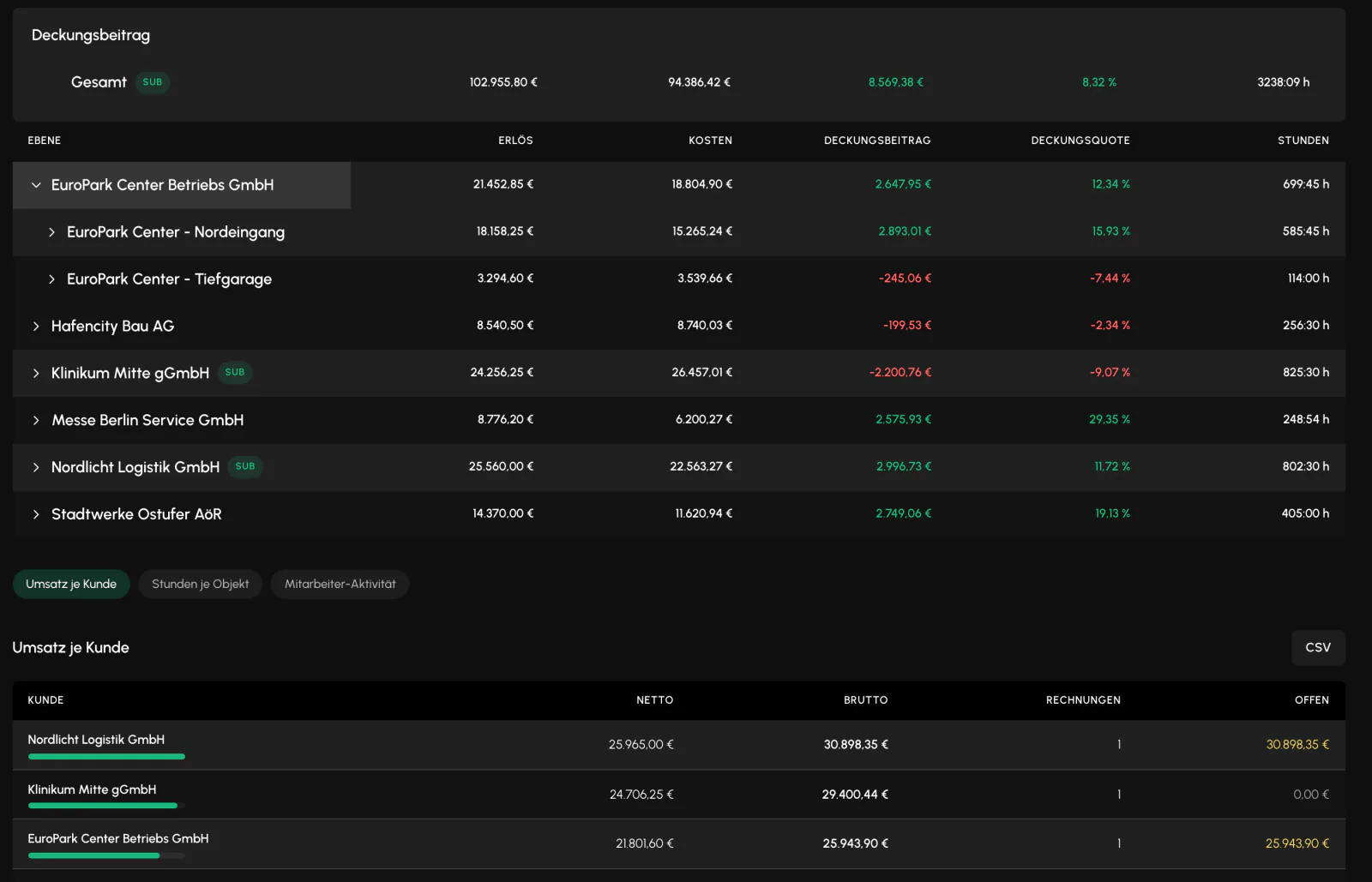
The "Contribution margin" section shows revenue, costs, contribution margin in euros, contribution margin percentage and hours worked for each customer. A customer row can be expanded to show sites, individual shifts and the security officers assigned. Green indicates a positive contribution margin, and red a negative one.
The figures are a breakdown of the same values used for invoices and the payroll preview. There is no second calculation engine. Delegated shifts have a "Sub" label. The subcontractor's remuneration counts as the cost. If no purchase rate is stored for a delegated shift, costs and contribution margin show a line instead of an assumed zero.
A warning sign on a row means unpriced time: no hourly rate can be resolved for these minutes, so the revenue for this time is zero. What to do: Maintain a rate, see "Which hourly rate applies". The period then shows the row fully priced.
If a row is deep red: Expand it down to the shift. Common causes are a customer rate that is too low, expensive individual shifts or a security officer's monthly amounts being spread over only a few assignments.
Outgoing invoice register
The "Outgoing register" tab in Invoicing is the continuous record of all invoices issued during a period: number, date, customer, net, tax, gross, status, payment date and cancellation date, with total rows and a CSV export. Drafts do not appear because they have not yet been issued. Canceled invoices remain visible, with their credit note in a separate row next to them.
The register also checks the number sequence. If a number is missing from the continuous sequence, the gap is shown. What a gap means: The missing number was assigned, but the invoice is outside the selected period or year. Extend the period and check. The register does not repair anything by itself and does not change any invoices.
Billing time rounding for each customer
Time rounding can be maintained for customer billing: an interval of 5, 10, 15, 30 or 60 minutes and the direction, rounding up, rounding down or commercial rounding. This is maintained in the Billing section of the customer record.
Once set, the rule applies to each assignment before invoice line items are created, starting with the next draft generation. Existing invoices and drafts remain unchanged, and payroll is always unaffected. Rounding applies only to billing.
Without a setting, no rounding applies and billing remains exact to the minute.
Related
- Hours ReportThe hours report is the only calculation engine for minutes. Payroll, invoicing and controlling all use the same source.
- Payroll and PremiumsBalerion Security calculates gross pay and tax-free premiums. The payroll office handles payroll tax, social insurance and net pay.
- Period ClosingA closed month remains fully readable. Only write operations are locked.
Updated on: 03.09.2026