'%20fill='%23fff'%20fill-rule='evenodd'%20clip-rule='evenodd'%20d='M1.94516e-05%200.0202086C0.0420195%201.22421%2015.477%2022.8672%2025.974%2036.4392C80.466%20106.895%20148.48%20166.337%20231.974%20216.477C250.654%20227.694%20271.214%20239.258%20308.974%20259.785C390.041%20303.855%20418.027%20323.655%20445.375%20356.29C457.567%20370.839%20458.267%20370.657%20438.242%20358.146C387.532%20326.465%20356.693%20316.359%20305.474%20314.635C278.901%20313.741%20256.584%20316.015%20228.224%20322.508C219.385%20324.532%20216.216%20326.29%20221.407%20326.29C233.608%20326.29%20264.586%20334.87%20282.263%20343.145C295.881%20349.52%20314.974%20361.858%20314.974%20364.283C314.974%20364.695%20312.612%20365.334%20309.724%20365.703C241.199%20374.463%20154.183%20428.191%2092.562%20499.79C75.09%20520.091%2071.7%20524.859%2077.035%20521.628C78.926%20520.482%2084.728%20516.968%2089.927%20513.819C112.706%20500.021%20145.195%20487.437%20169.935%20482.828C181.824%20480.613%20205.552%20478.817%20211.298%20479.696L216.122%20480.435L203.794%20493.112C142.137%20556.516%20104.948%20625.881%2092.913%20699.925C90.533%20714.569%2090.783%20715.586%2094.806%20707.641C105.92%20685.691%20127.936%20659.716%20144.474%20649.04C150.781%20644.969%20158.103%20641.29%20159.899%20641.29C160.273%20641.29%20161.083%20648.827%20161.699%20658.04C165.47%20714.441%20188.011%20764.593%20226.674%20802.603C262.563%20837.887%20306.066%20866.035%20398.474%20913.767C434.747%20932.503%20444.973%20937.877%20458.974%20945.562C570.722%201006.9%20619.955%201060.37%20650.021%201153.06C653.459%201163.66%20656.39%201172.21%20656.535%201172.06C656.68%201171.91%20657.989%201166.17%20659.445%201159.29C682.51%201050.31%20655.152%20934.035%20584.506%20840.79C562.617%20811.9%20543.899%20791.508%20489.954%20737.79C426.931%20675.032%20411.607%20655.099%20405.006%20627.29C392.323%20573.863%20438.939%20538.423%20500.849%20554.425C526.675%20561.1%20544.604%20577.062%20549.915%20598.107L551.59%20604.743L564.032%20606.485C634.063%20616.289%20704.147%20646.368%20736.626%20680.561C749.96%20694.598%20749.787%20706.055%20736.132%20713.269L732.474%20715.202L742.766%20715.246C753.94%20715.294%20764.079%20713.573%20776.282%20709.556L784.091%20706.987L786.782%20708.95C791.451%20712.357%20797.8%20722.825%20799.144%20729.336C800.681%20736.776%20800.851%20736.757%20806.282%20728.54C830.903%20691.286%20836.954%20633.079%20820.076%20595.855L817.271%20589.667L808.372%20586.346C782.299%20576.613%20762.637%20558.586%20741.181%20524.743C729.885%20506.926%20727.08%20500.527%20723.898%20485.323C719.333%20463.505%20718.535%20461.808%20707.053%20449.509C690.138%20431.393%20684.217%20423.522%20661.746%20389.29C602.592%20299.172%20519.411%20225.38%20413.356%20168.936C385.699%20154.217%20328.981%20128.949%20327.322%20130.609C327.135%20130.796%20332.883%20134.879%20340.096%20139.682C394.802%20176.112%20443.502%20218.504%20467.755%20250.806C475.015%20260.475%20485.69%20277.926%20484.843%20278.74C484.64%20278.936%20480.199%20275.945%20474.974%20272.096C430.93%20239.644%20400.199%20223.792%20315.974%20190.078C174.722%20133.537%20108.045%2094.3042%2016.767%2014.0202C7.53105%205.89621%20-0.0139805%20-0.403791%201.94516e-05%200.0202086ZM592.467%20436.927C603.971%20451.343%20612.149%20463.814%20615.502%20472.054C626.595%20499.317%20631.458%20503.825%20657.974%20511.427C664.299%20513.24%20674.182%20517.081%20679.937%20519.961C685.691%20522.842%20690.502%20525.096%20690.627%20524.971C690.752%20524.845%20688.519%20521.149%20685.664%20516.757C682.81%20512.364%20678.077%20504.207%20675.147%20498.629C668.633%20486.227%20664.825%20482.16%20649.462%20471.196C634.986%20460.866%20585.876%20426.936%20584.662%20426.427C584.187%20426.228%20587.699%20430.953%20592.467%20436.927Z'/%3e%3c/svg%3e)
Payroll and Premiums
Balerion Security calculates gross pay and tax-free premiums. The payroll office handles payroll tax, social insurance and net pay.
Requirements
- Hours reviewed and approved in the hours report
- Pay rate maintained for each security officer
- Country and federal state set for the public holiday calendar
What the preview shows
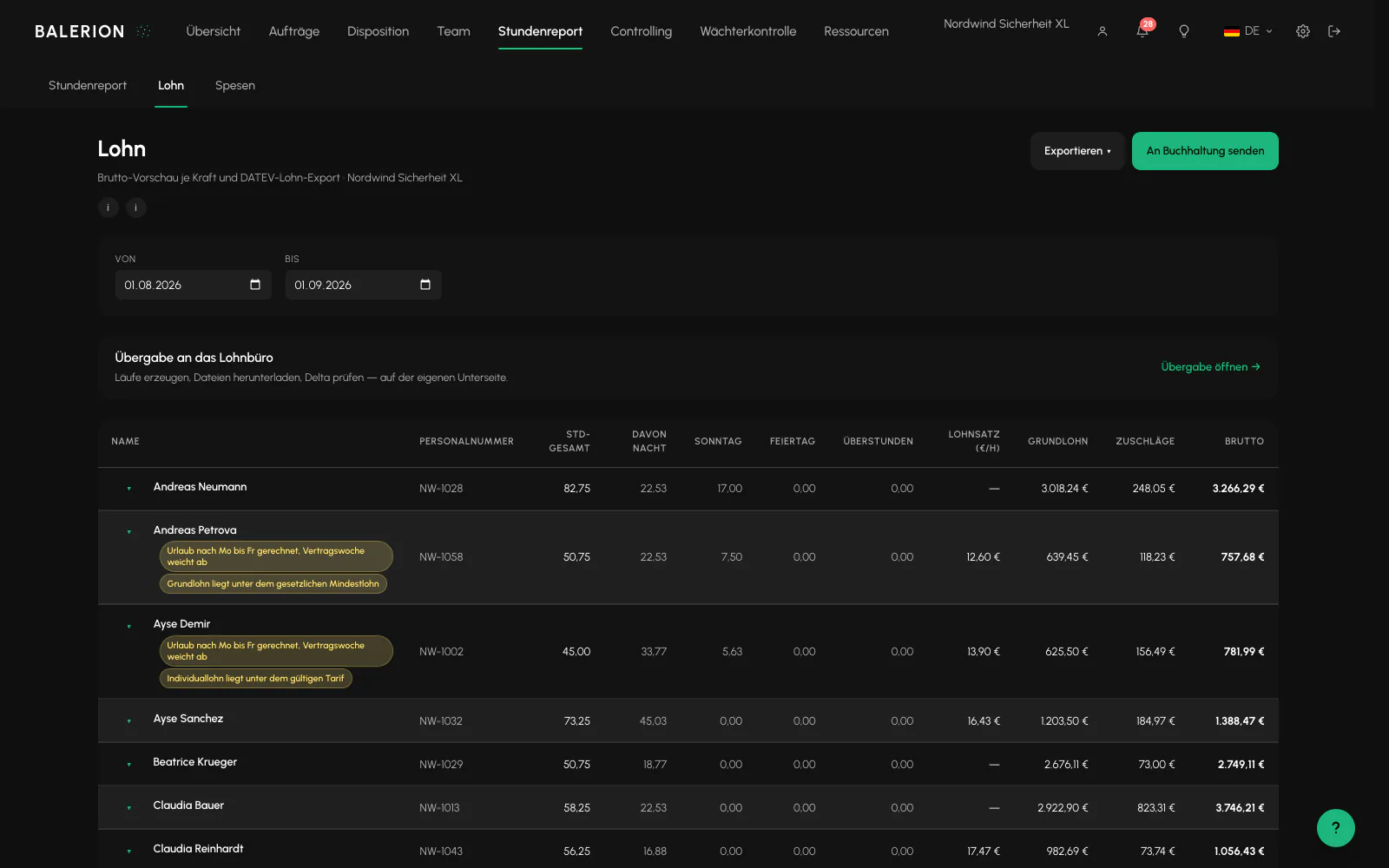
One row per security officer with total hours, night, Sunday and public holiday portions, pay rate, base pay, premiums and gross pay.
Explicitly not included: payroll tax, social insurance and net pay. The payroll office handles these.
Entgeltfortzahlung, meaning continued remuneration, is included if the relevant switch is on. Approved sickness and leave then appear as separate rows in the preview. The switch is off by default. In that case, approved absences appear only as a notice and are not paid. How it is calculated and where the switch is located are described under Wage Types and Premium Rules.
The basis is the counted time from the hours report, the same number that is also used for the invoice. If time rounding is configured there, payroll uses the rounded number.
Which pay rate applies
Here too, the most specific maintained value applies: fixed pay takes precedence over everything else. The fixed amount is then the base pay, and a site premium does not apply. Below that is the security officer's activity-based hourly wage, followed finally by their standard hourly wage.
An additional pay premium can be maintained for each site and employee category. It only increases base pay, never the percentage premiums.
If every rate is missing, the warning "No pay rate stored" appears. The calculation does not silently use zero.
Limit: The software does not check a minimum wage for each activity or federal state. It provides activity-based hourly wages for each security officer, which is different.
Public holidays
The public holiday portion is calculated from the calendar year without an external service. In addition to nationwide holidays, the rules of the selected federal state apply. Easter is calculated, and Buß- und Bettag is calculated as the Wednesday before 23. November.
22 countries are supported. For a country outside Germany, only the national set applies. Regions are not evaluated there. Night and Sunday checks always remain based on German local time.
Minimum wage notice
The gross pay preview checks every row against the statutory minimum wage that applies on the respective shift date. Balerion Security includes the statutory rates and their validity periods and keeps them up to date. If a base hourly wage is lower, the "Below minimum wage" notice appears for the security officer and the affected pay group, just like the existing collective agreement notice.
What to do: Check and increase the pay rate for the security officer or activity. See "Which pay rate applies". The notice does not block anything. It shows what needs to be clarified before the payroll handoff.
Export and transfer to accounting
The DATEV-oriented payroll export provides a CSV file with 16 columns, German number formatting and the date format TT.MM.JJJJ. A security officer can appear in multiple rows if their shifts were resolved using different rates. It is not a certified import format; the transfer is agreed with the payroll office.
There is also "Send to accounting". This sends the server-generated export by email to the address stored in the settings and logs the process. Nothing happens unless a destination has been configured. The function is off by default.
Important: The status "sent" confirms acceptance by the email provider. It does not mean that DATEV or Lexware imported the document.
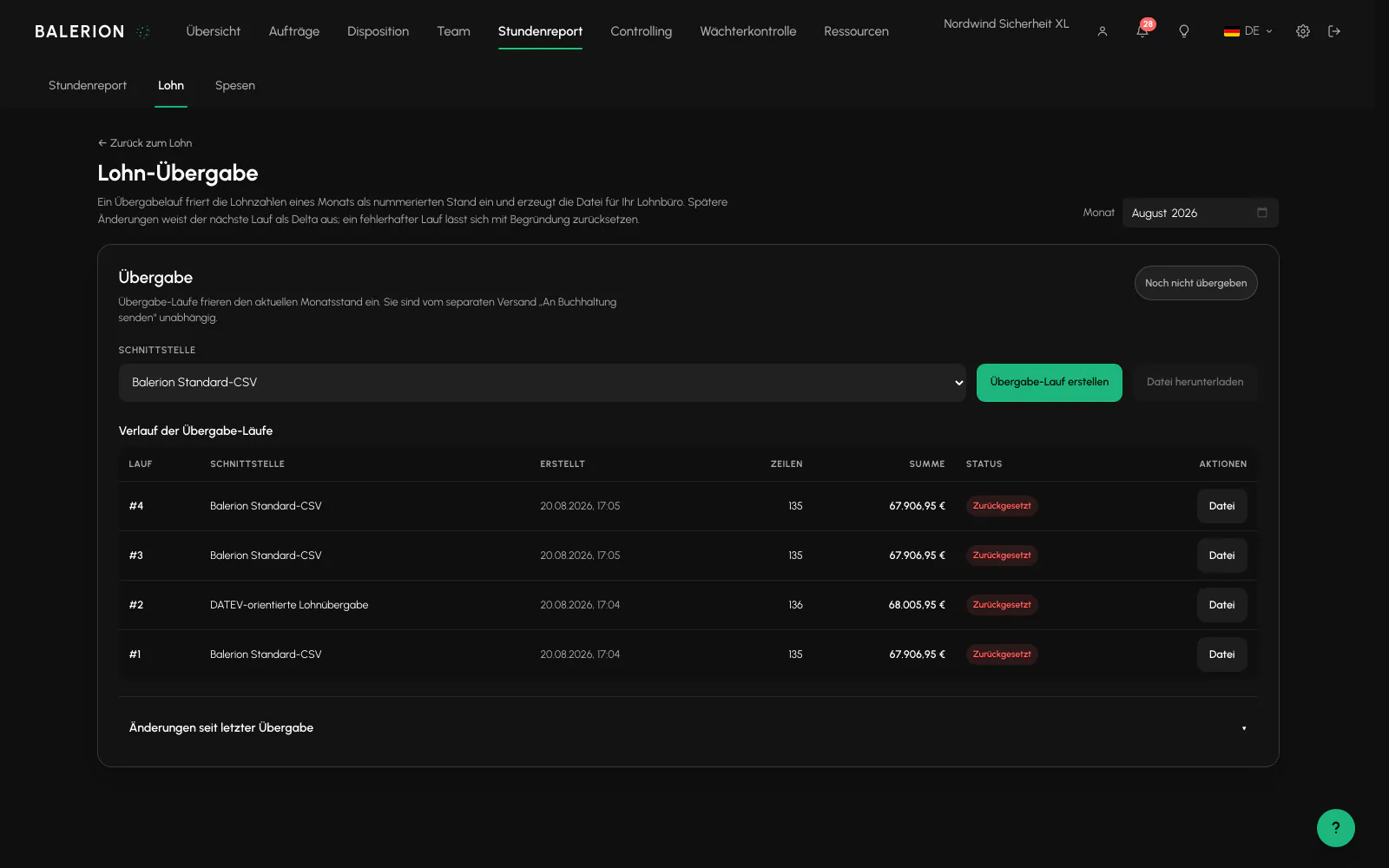
There is also the handoff run. It freezes the payroll figures for one month as a numbered record and generates the file for the payroll office from it. If anything changes in the month afterward, the difference is shown as a delta against this record instead of disappearing without notice. A run can be reset with a reason.
Working time account
The Arbeitszeitkonto, meaning working time account, is based on a model, a set of rules that you create once and assign to multiple security officers. Create it in Settings under Payroll, then assign it to the employee on the Contract and Personnel tab. Without an assigned model, there is no account. It also requires contractual hours and contractual working days as a basis. If either is missing, the card tells you.
The current balance, the model limits and the monthly history with target, actual, credit, adjustment and balance are displayed.
Limits. A model has a lower limit, meaning how far the account may go into the negative, and an upper limit for positive hours. Both are entered in hours and stored with minute precision. The balance is capped at these limits, so the account does not continue indefinitely.
This does not reduce anyone's pay. Payroll is not calculated through the working time account but from the counted time in the hours report. With hourly pay, every counted minute is paid in the month in which it occurred, regardless of what the account shows. The account is a separate target and actual record, not a fund used for payment.
Fixed pay works differently, because the monthly amount is fixed and the additional hours accumulate in this account. Set the upper limit so that it is not reached in day-to-day operations, and maintain a payout threshold below it. Then the balance is reduced or paid out before the limit takes effect.
Payout. If a payout threshold is maintained, a payout proposal appears when the balance reaches it. If you pay it out, it is posted as a payroll item and simultaneously as a negative adjustment to the account. This prevents the hours from being counted twice.
Adjustments are available. Under "Post adjustment", enter whole minutes with a sign. A reason is required. This is only possible in open months. Closed months are locked, see Period Closing.
Annual carryover. A switch on each model determines whether the balance is carried into the new year. It is on by default. If you turn it off, the December closing balance is shown and January starts at zero.
What does not count toward the account: Wage types can be marked "exclude from working time account". These minutes are paid out and are not additionally credited. A Freiwunsch, meaning a preferred day off, also has no effect on the account.
Where the rates and numbers come from
Three settings determine how the preview calculates and what appears in the export. Each has its own chapter:
- Wage Types and Premium Rules: the numbers from your payroll software, freely combinable premium rules and calculation behavior including time rounding.
- Collective Agreement Regions: dated base and activity rates for each region. The collective agreement region assigned to the site takes precedence over the one assigned to the security officer.
- Payroll Handoff: format and runs for the handoff to the payroll office.
If a security officer is on standby, a notice appears in the relevant row of the preview. Work already performed remains paid.
Related
- Hours ReportThe hours report is the only calculation engine for minutes. Payroll, invoicing and controlling all use the same source.
- Wage Types and Premium RulesThe items carry the wage type numbers used by your payroll software so that the payroll export can be processed there. Maintain them here.
- Collective Agreement RegionsCompanies operating across federal state borders do not pay the same rates everywhere. Collective agreement regions keep the rates separate and dated.
- Payroll HandoffThe reviewed payroll preview is sent to the payroll office as a run. Every run is dated and traceable.
Updated on: 03.09.2026