'%20fill='%23fff'%20fill-rule='evenodd'%20clip-rule='evenodd'%20d='M1.94516e-05%200.0202086C0.0420195%201.22421%2015.477%2022.8672%2025.974%2036.4392C80.466%20106.895%20148.48%20166.337%20231.974%20216.477C250.654%20227.694%20271.214%20239.258%20308.974%20259.785C390.041%20303.855%20418.027%20323.655%20445.375%20356.29C457.567%20370.839%20458.267%20370.657%20438.242%20358.146C387.532%20326.465%20356.693%20316.359%20305.474%20314.635C278.901%20313.741%20256.584%20316.015%20228.224%20322.508C219.385%20324.532%20216.216%20326.29%20221.407%20326.29C233.608%20326.29%20264.586%20334.87%20282.263%20343.145C295.881%20349.52%20314.974%20361.858%20314.974%20364.283C314.974%20364.695%20312.612%20365.334%20309.724%20365.703C241.199%20374.463%20154.183%20428.191%2092.562%20499.79C75.09%20520.091%2071.7%20524.859%2077.035%20521.628C78.926%20520.482%2084.728%20516.968%2089.927%20513.819C112.706%20500.021%20145.195%20487.437%20169.935%20482.828C181.824%20480.613%20205.552%20478.817%20211.298%20479.696L216.122%20480.435L203.794%20493.112C142.137%20556.516%20104.948%20625.881%2092.913%20699.925C90.533%20714.569%2090.783%20715.586%2094.806%20707.641C105.92%20685.691%20127.936%20659.716%20144.474%20649.04C150.781%20644.969%20158.103%20641.29%20159.899%20641.29C160.273%20641.29%20161.083%20648.827%20161.699%20658.04C165.47%20714.441%20188.011%20764.593%20226.674%20802.603C262.563%20837.887%20306.066%20866.035%20398.474%20913.767C434.747%20932.503%20444.973%20937.877%20458.974%20945.562C570.722%201006.9%20619.955%201060.37%20650.021%201153.06C653.459%201163.66%20656.39%201172.21%20656.535%201172.06C656.68%201171.91%20657.989%201166.17%20659.445%201159.29C682.51%201050.31%20655.152%20934.035%20584.506%20840.79C562.617%20811.9%20543.899%20791.508%20489.954%20737.79C426.931%20675.032%20411.607%20655.099%20405.006%20627.29C392.323%20573.863%20438.939%20538.423%20500.849%20554.425C526.675%20561.1%20544.604%20577.062%20549.915%20598.107L551.59%20604.743L564.032%20606.485C634.063%20616.289%20704.147%20646.368%20736.626%20680.561C749.96%20694.598%20749.787%20706.055%20736.132%20713.269L732.474%20715.202L742.766%20715.246C753.94%20715.294%20764.079%20713.573%20776.282%20709.556L784.091%20706.987L786.782%20708.95C791.451%20712.357%20797.8%20722.825%20799.144%20729.336C800.681%20736.776%20800.851%20736.757%20806.282%20728.54C830.903%20691.286%20836.954%20633.079%20820.076%20595.855L817.271%20589.667L808.372%20586.346C782.299%20576.613%20762.637%20558.586%20741.181%20524.743C729.885%20506.926%20727.08%20500.527%20723.898%20485.323C719.333%20463.505%20718.535%20461.808%20707.053%20449.509C690.138%20431.393%20684.217%20423.522%20661.746%20389.29C602.592%20299.172%20519.411%20225.38%20413.356%20168.936C385.699%20154.217%20328.981%20128.949%20327.322%20130.609C327.135%20130.796%20332.883%20134.879%20340.096%20139.682C394.802%20176.112%20443.502%20218.504%20467.755%20250.806C475.015%20260.475%20485.69%20277.926%20484.843%20278.74C484.64%20278.936%20480.199%20275.945%20474.974%20272.096C430.93%20239.644%20400.199%20223.792%20315.974%20190.078C174.722%20133.537%20108.045%2094.3042%2016.767%2014.0202C7.53105%205.89621%20-0.0139805%20-0.403791%201.94516e-05%200.0202086ZM592.467%20436.927C603.971%20451.343%20612.149%20463.814%20615.502%20472.054C626.595%20499.317%20631.458%20503.825%20657.974%20511.427C664.299%20513.24%20674.182%20517.081%20679.937%20519.961C685.691%20522.842%20690.502%20525.096%20690.627%20524.971C690.752%20524.845%20688.519%20521.149%20685.664%20516.757C682.81%20512.364%20678.077%20504.207%20675.147%20498.629C668.633%20486.227%20664.825%20482.16%20649.462%20471.196C634.986%20460.866%20585.876%20426.936%20584.662%20426.427C584.187%20426.228%20587.699%20430.953%20592.467%20436.927Z'/%3e%3c/svg%3e)
Betriebsrat and Plan Approval
For companies with codetermination: the monthly plan is sent out only after Scheduling and the Betriebsrat have approved it.
Requirements
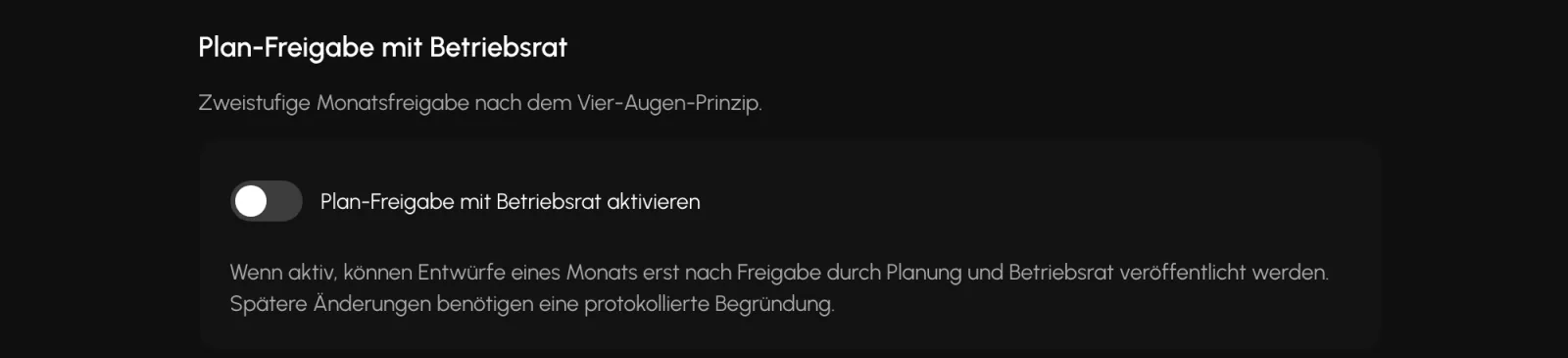
- The "Plan approval with Betriebsrat" switch is on, it is off by default
- At least two people, the dual control principle is enforced
The Betriebsrat role
Betriebsrat is a supplied role with exactly three permissions: read plans, read reports, and sign the second approval stage. Everything else is denied.
The Betriebsrat does not see payroll data. Payroll, Controlling, and Expenses deny access. What the role can see in reports is time data only, without any amounts: planned time, actual time, counted time, check-in, and check-out.
The role also cannot see employee master data, customers, inventory, invoicing, or communications to security officers.
A note that saves searching: The menu bar is not reduced for this role. The Betriebsrat sees menu items that cannot be opened. The plan view in Scheduling and Shifts, the hours report, the Analysis, and the Audit Log work for this role.
Approve in two stages
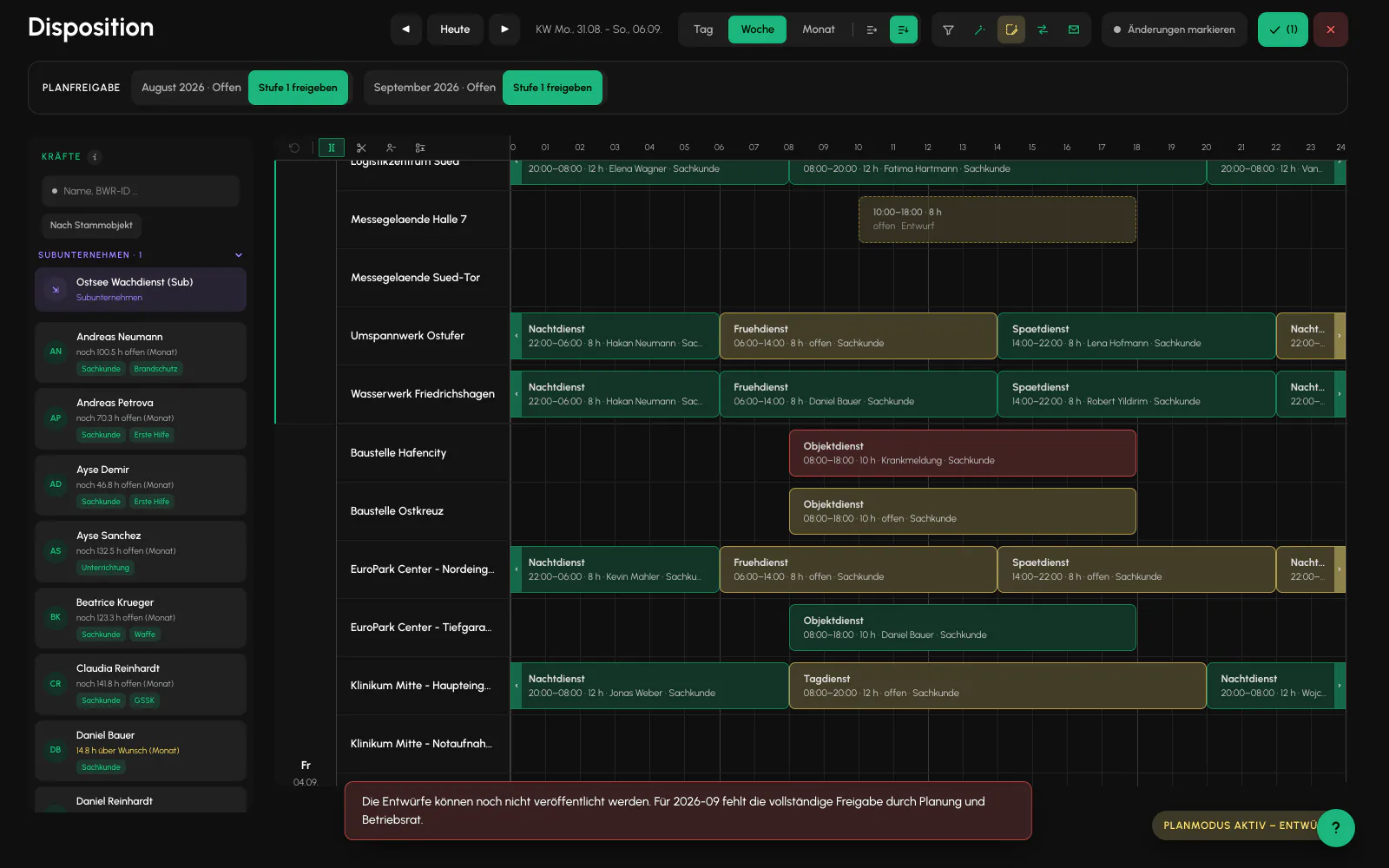
Approval always applies to a full calendar month, not an individual shift or a freely selected period. The approval status is shown as a row above the plan in Scheduling and Shifts, with one field for each visible month. There is no separate page for it.
A month moves through: open, stage 1, approved. Scheduling signs stage 1, and the Betriebsrat signs stage 2.
The same person cannot sign both stages. This is strictly enforced. The button then disappears and "Second person required" is shown. Even someone with both permissions cannot countersign their own approval.
What is blocked without approval
Exactly one thing: publishing draft shifts. Planning, creating, assigning, and changing remain permitted. Security officers simply do not learn about them.
An attempt to publish without full approval is rejected and lists the affected months. Partial approval is not enough. Stage 1 alone does not release anything.
Changes after approval
Once a month has been signed, every plan change in that month requires a reason of 10 to 500 characters. The dialog appears automatically as soon as the server pauses the change, and the exact wording is logged.
The month then reverts to "changed" and must be signed again. The number of times this happens is counted.
If a change fails for technical reasons, the approval remains in place. Only a change that is actually written reverts the month.
Do not confuse it with the period close
Both operate on calendar months and both apply restrictions, but they do opposite things:
- Plan approval acts beforehand and opens: it enables publishing. It is off by default and requires two people.
- Period close acts afterward and closes: it seals the settled month against changes. It is always available and one person is sufficient.
They also depend on different permissions. The Betriebsrat cannot close or reopen a month and cannot see the corresponding setting at all.
Related
- Team and RolesSix roles, with a finely structured set of permissions above them. What someone sees is determined by the permission, not the role alone.
- Period ClosingA closed month remains fully readable. Only write operations are locked.
- Audit LogEvery overridden rule is listed here with the person, time, and reason. An empty log is the desired result.
Updated on: 03.09.2026