'%20fill='%23fff'%20fill-rule='evenodd'%20clip-rule='evenodd'%20d='M1.94516e-05%200.0202086C0.0420195%201.22421%2015.477%2022.8672%2025.974%2036.4392C80.466%20106.895%20148.48%20166.337%20231.974%20216.477C250.654%20227.694%20271.214%20239.258%20308.974%20259.785C390.041%20303.855%20418.027%20323.655%20445.375%20356.29C457.567%20370.839%20458.267%20370.657%20438.242%20358.146C387.532%20326.465%20356.693%20316.359%20305.474%20314.635C278.901%20313.741%20256.584%20316.015%20228.224%20322.508C219.385%20324.532%20216.216%20326.29%20221.407%20326.29C233.608%20326.29%20264.586%20334.87%20282.263%20343.145C295.881%20349.52%20314.974%20361.858%20314.974%20364.283C314.974%20364.695%20312.612%20365.334%20309.724%20365.703C241.199%20374.463%20154.183%20428.191%2092.562%20499.79C75.09%20520.091%2071.7%20524.859%2077.035%20521.628C78.926%20520.482%2084.728%20516.968%2089.927%20513.819C112.706%20500.021%20145.195%20487.437%20169.935%20482.828C181.824%20480.613%20205.552%20478.817%20211.298%20479.696L216.122%20480.435L203.794%20493.112C142.137%20556.516%20104.948%20625.881%2092.913%20699.925C90.533%20714.569%2090.783%20715.586%2094.806%20707.641C105.92%20685.691%20127.936%20659.716%20144.474%20649.04C150.781%20644.969%20158.103%20641.29%20159.899%20641.29C160.273%20641.29%20161.083%20648.827%20161.699%20658.04C165.47%20714.441%20188.011%20764.593%20226.674%20802.603C262.563%20837.887%20306.066%20866.035%20398.474%20913.767C434.747%20932.503%20444.973%20937.877%20458.974%20945.562C570.722%201006.9%20619.955%201060.37%20650.021%201153.06C653.459%201163.66%20656.39%201172.21%20656.535%201172.06C656.68%201171.91%20657.989%201166.17%20659.445%201159.29C682.51%201050.31%20655.152%20934.035%20584.506%20840.79C562.617%20811.9%20543.899%20791.508%20489.954%20737.79C426.931%20675.032%20411.607%20655.099%20405.006%20627.29C392.323%20573.863%20438.939%20538.423%20500.849%20554.425C526.675%20561.1%20544.604%20577.062%20549.915%20598.107L551.59%20604.743L564.032%20606.485C634.063%20616.289%20704.147%20646.368%20736.626%20680.561C749.96%20694.598%20749.787%20706.055%20736.132%20713.269L732.474%20715.202L742.766%20715.246C753.94%20715.294%20764.079%20713.573%20776.282%20709.556L784.091%20706.987L786.782%20708.95C791.451%20712.357%20797.8%20722.825%20799.144%20729.336C800.681%20736.776%20800.851%20736.757%20806.282%20728.54C830.903%20691.286%20836.954%20633.079%20820.076%20595.855L817.271%20589.667L808.372%20586.346C782.299%20576.613%20762.637%20558.586%20741.181%20524.743C729.885%20506.926%20727.08%20500.527%20723.898%20485.323C719.333%20463.505%20718.535%20461.808%20707.053%20449.509C690.138%20431.393%20684.217%20423.522%20661.746%20389.29C602.592%20299.172%20519.411%20225.38%20413.356%20168.936C385.699%20154.217%20328.981%20128.949%20327.322%20130.609C327.135%20130.796%20332.883%20134.879%20340.096%20139.682C394.802%20176.112%20443.502%20218.504%20467.755%20250.806C475.015%20260.475%20485.69%20277.926%20484.843%20278.74C484.64%20278.936%20480.199%20275.945%20474.974%20272.096C430.93%20239.644%20400.199%20223.792%20315.974%20190.078C174.722%20133.537%20108.045%2094.3042%2016.767%2014.0202C7.53105%205.89621%20-0.0139805%20-0.403791%201.94516e-05%200.0202086ZM592.467%20436.927C603.971%20451.343%20612.149%20463.814%20615.502%20472.054C626.595%20499.317%20631.458%20503.825%20657.974%20511.427C664.299%20513.24%20674.182%20517.081%20679.937%20519.961C685.691%20522.842%20690.502%20525.096%20690.627%20524.971C690.752%20524.845%20688.519%20521.149%20685.664%20516.757C682.81%20512.364%20678.077%20504.207%20675.147%20498.629C668.633%20486.227%20664.825%20482.16%20649.462%20471.196C634.986%20460.866%20585.876%20426.936%20584.662%20426.427C584.187%20426.228%20587.699%20430.953%20592.467%20436.927Z'/%3e%3c/svg%3e)
Deals and Pricing Models
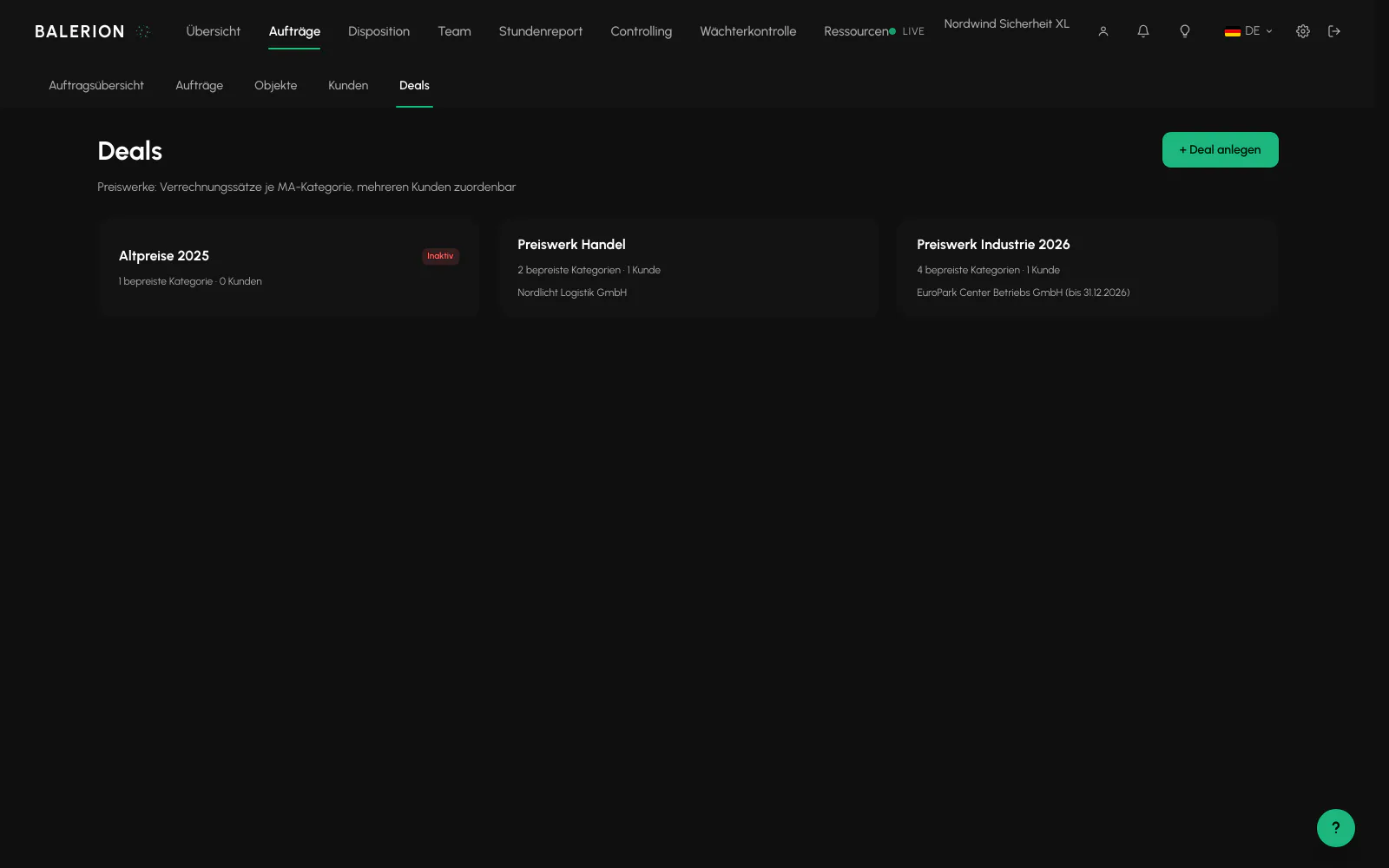
A deal is a pricing model: a set of billing rates by employee category that you can assign to several customers at the same time.
Requirements
- Owner role, the tab is visible only to this role
- Employee categories maintained under Master data in the settings
What a deal is for
Without a deal, every price is maintained separately at the site, on the order or as the customer's standard rate. As soon as several customers use the same terms, this becomes cumbersome and the rates diverge.
A deal combines the rates once and is then assigned. If you change the deal, all assigned customers change with it.
You can find it under Orders, on the Deals tab.
Creating a deal
Select "+ Create deal", then enter a name and optionally a note. The Active switch controls whether the deal applies at all.
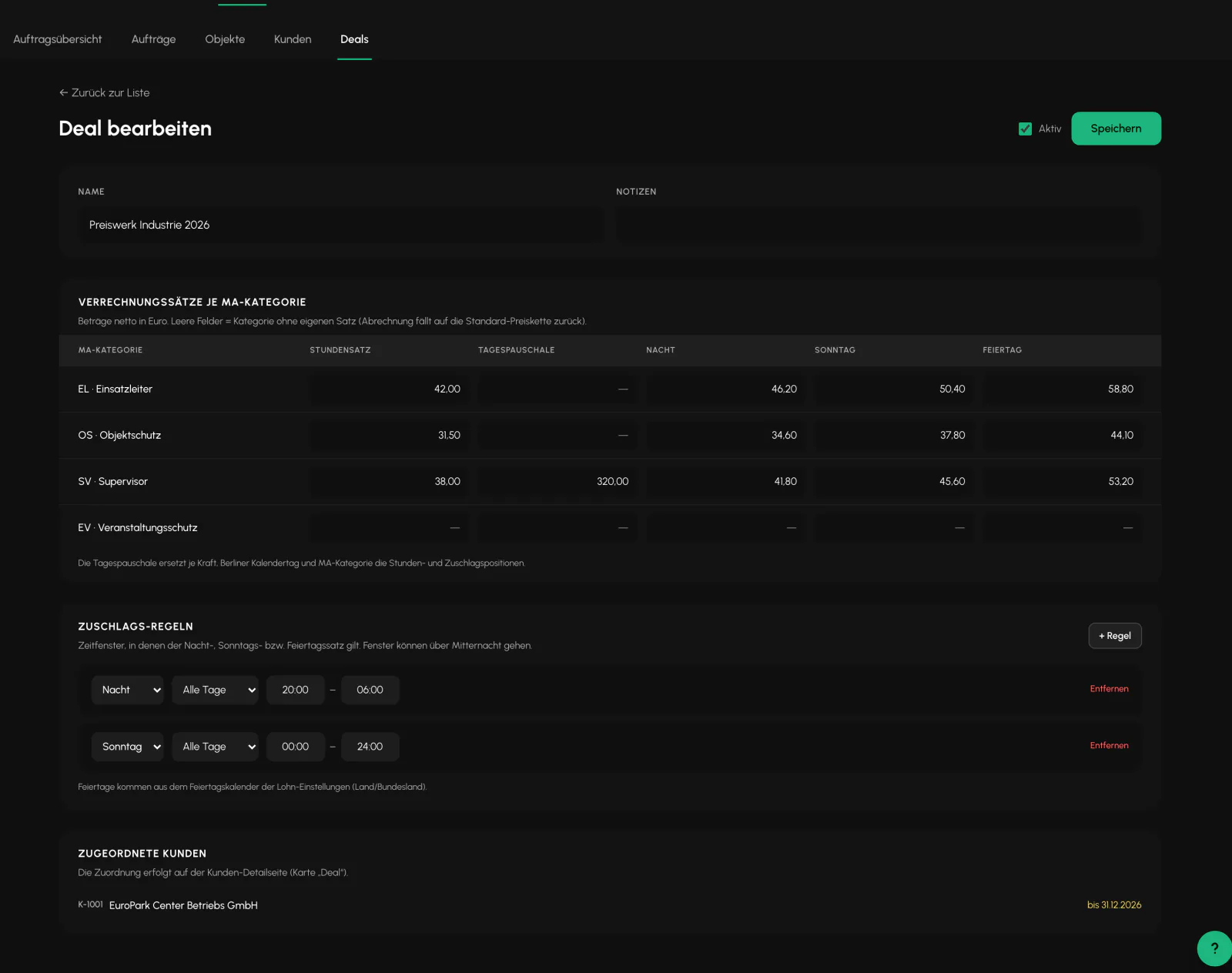
In the Billing rates by employee category section, each category has a row with five fields: Hourly rate, Daily flat rate, Night, Sunday and Public holiday. All amounts are net in euros.
An empty field does not mean zero. It means no separate rate. Billing for this category then falls back to the standard pricing chain.
The daily flat rate
If a row contains a daily flat rate, it replaces the hourly and premium items for each security officer, calendar day and category. Billing is therefore based on the flat rate instead of an additional hourly charge.
This is the most common surprise here: if you enter a flat rate and still expect hourly items, you will not find them on the invoice.
Assigning it to a customer
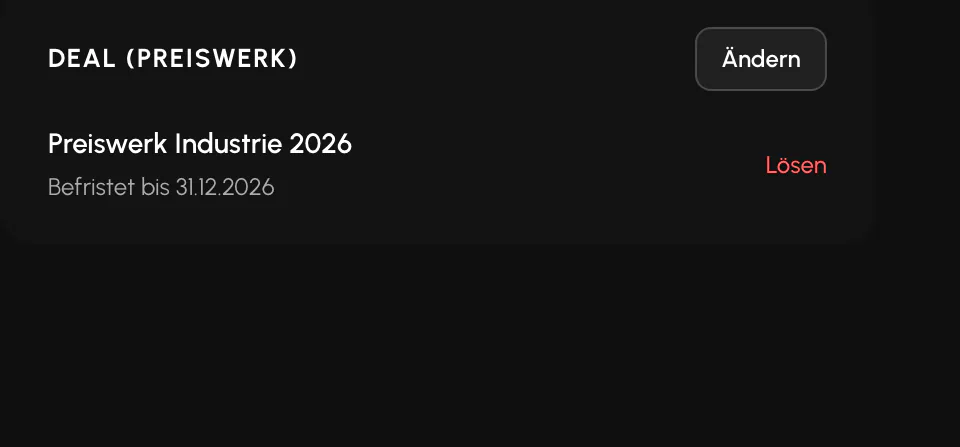
The assignment is not made in the deal, but on the customer details page in the "Deal (pricing model)" card. Select "Assign deal", choose the deal and optionally set an end date.
Without an end date, the deal applies indefinitely. When the end date passes, the standard pricing chain automatically applies again without requiring intervention.
In the deal itself, the "Assigned customers" section only lists the customers already linked to it.
Relationship to the other rates
The deal is one level in the pricing chain, not a replacement for it. If the deal has no rate for a category, the rest of the chain continues to apply.
If you remove the assignment, the customer's billing falls back to the standard pricing chain. The confirmation dialog states this explicitly because invoice amounts can change as a result.
Which level takes precedence and when is described in Invoicing and Controlling.
Related
- Invoicing and ControllingReviewed hours become a draft invoice. Which hourly rate applies depends on where you maintained it.
- Orders and SitesThe order generates the shifts. The site provides the geofence, contacts and prices.
- Price IncreaseRaise hourly rates for many customers at once, by a percentage or a fixed surcharge. Calculate first, then execute.
Updated on: 03.09.2026