'%20fill='%23fff'%20fill-rule='evenodd'%20clip-rule='evenodd'%20d='M1.94516e-05%200.0202086C0.0420195%201.22421%2015.477%2022.8672%2025.974%2036.4392C80.466%20106.895%20148.48%20166.337%20231.974%20216.477C250.654%20227.694%20271.214%20239.258%20308.974%20259.785C390.041%20303.855%20418.027%20323.655%20445.375%20356.29C457.567%20370.839%20458.267%20370.657%20438.242%20358.146C387.532%20326.465%20356.693%20316.359%20305.474%20314.635C278.901%20313.741%20256.584%20316.015%20228.224%20322.508C219.385%20324.532%20216.216%20326.29%20221.407%20326.29C233.608%20326.29%20264.586%20334.87%20282.263%20343.145C295.881%20349.52%20314.974%20361.858%20314.974%20364.283C314.974%20364.695%20312.612%20365.334%20309.724%20365.703C241.199%20374.463%20154.183%20428.191%2092.562%20499.79C75.09%20520.091%2071.7%20524.859%2077.035%20521.628C78.926%20520.482%2084.728%20516.968%2089.927%20513.819C112.706%20500.021%20145.195%20487.437%20169.935%20482.828C181.824%20480.613%20205.552%20478.817%20211.298%20479.696L216.122%20480.435L203.794%20493.112C142.137%20556.516%20104.948%20625.881%2092.913%20699.925C90.533%20714.569%2090.783%20715.586%2094.806%20707.641C105.92%20685.691%20127.936%20659.716%20144.474%20649.04C150.781%20644.969%20158.103%20641.29%20159.899%20641.29C160.273%20641.29%20161.083%20648.827%20161.699%20658.04C165.47%20714.441%20188.011%20764.593%20226.674%20802.603C262.563%20837.887%20306.066%20866.035%20398.474%20913.767C434.747%20932.503%20444.973%20937.877%20458.974%20945.562C570.722%201006.9%20619.955%201060.37%20650.021%201153.06C653.459%201163.66%20656.39%201172.21%20656.535%201172.06C656.68%201171.91%20657.989%201166.17%20659.445%201159.29C682.51%201050.31%20655.152%20934.035%20584.506%20840.79C562.617%20811.9%20543.899%20791.508%20489.954%20737.79C426.931%20675.032%20411.607%20655.099%20405.006%20627.29C392.323%20573.863%20438.939%20538.423%20500.849%20554.425C526.675%20561.1%20544.604%20577.062%20549.915%20598.107L551.59%20604.743L564.032%20606.485C634.063%20616.289%20704.147%20646.368%20736.626%20680.561C749.96%20694.598%20749.787%20706.055%20736.132%20713.269L732.474%20715.202L742.766%20715.246C753.94%20715.294%20764.079%20713.573%20776.282%20709.556L784.091%20706.987L786.782%20708.95C791.451%20712.357%20797.8%20722.825%20799.144%20729.336C800.681%20736.776%20800.851%20736.757%20806.282%20728.54C830.903%20691.286%20836.954%20633.079%20820.076%20595.855L817.271%20589.667L808.372%20586.346C782.299%20576.613%20762.637%20558.586%20741.181%20524.743C729.885%20506.926%20727.08%20500.527%20723.898%20485.323C719.333%20463.505%20718.535%20461.808%20707.053%20449.509C690.138%20431.393%20684.217%20423.522%20661.746%20389.29C602.592%20299.172%20519.411%20225.38%20413.356%20168.936C385.699%20154.217%20328.981%20128.949%20327.322%20130.609C327.135%20130.796%20332.883%20134.879%20340.096%20139.682C394.802%20176.112%20443.502%20218.504%20467.755%20250.806C475.015%20260.475%20485.69%20277.926%20484.843%20278.74C484.64%20278.936%20480.199%20275.945%20474.974%20272.096C430.93%20239.644%20400.199%20223.792%20315.974%20190.078C174.722%20133.537%20108.045%2094.3042%2016.767%2014.0202C7.53105%205.89621%20-0.0139805%20-0.403791%201.94516e-05%200.0202086ZM592.467%20436.927C603.971%20451.343%20612.149%20463.814%20615.502%20472.054C626.595%20499.317%20631.458%20503.825%20657.974%20511.427C664.299%20513.24%20674.182%20517.081%20679.937%20519.961C685.691%20522.842%20690.502%20525.096%20690.627%20524.971C690.752%20524.845%20688.519%20521.149%20685.664%20516.757C682.81%20512.364%20678.077%20504.207%20675.147%20498.629C668.633%20486.227%20664.825%20482.16%20649.462%20471.196C634.986%20460.866%20585.876%20426.936%20584.662%20426.427C584.187%20426.228%20587.699%20430.953%20592.467%20436.927Z'/%3e%3c/svg%3e)
Sending Schedules
Send the plan as a PDF to a security officer or the customer.
Send
Select a target and a period. The current week is the default. Two targets are available:
- To a security officer: Their own shifts are included, and the column shows the site. The recipient is their stored address. A different address can be entered for this one delivery.
- To a site: All shifts at this site are included, and the column shows the assigned security officers. Unstaffed shifts are shown as "open". The recipient is the customer for the site.
The period covers 1 to 62 days. Sending does not change the plan.
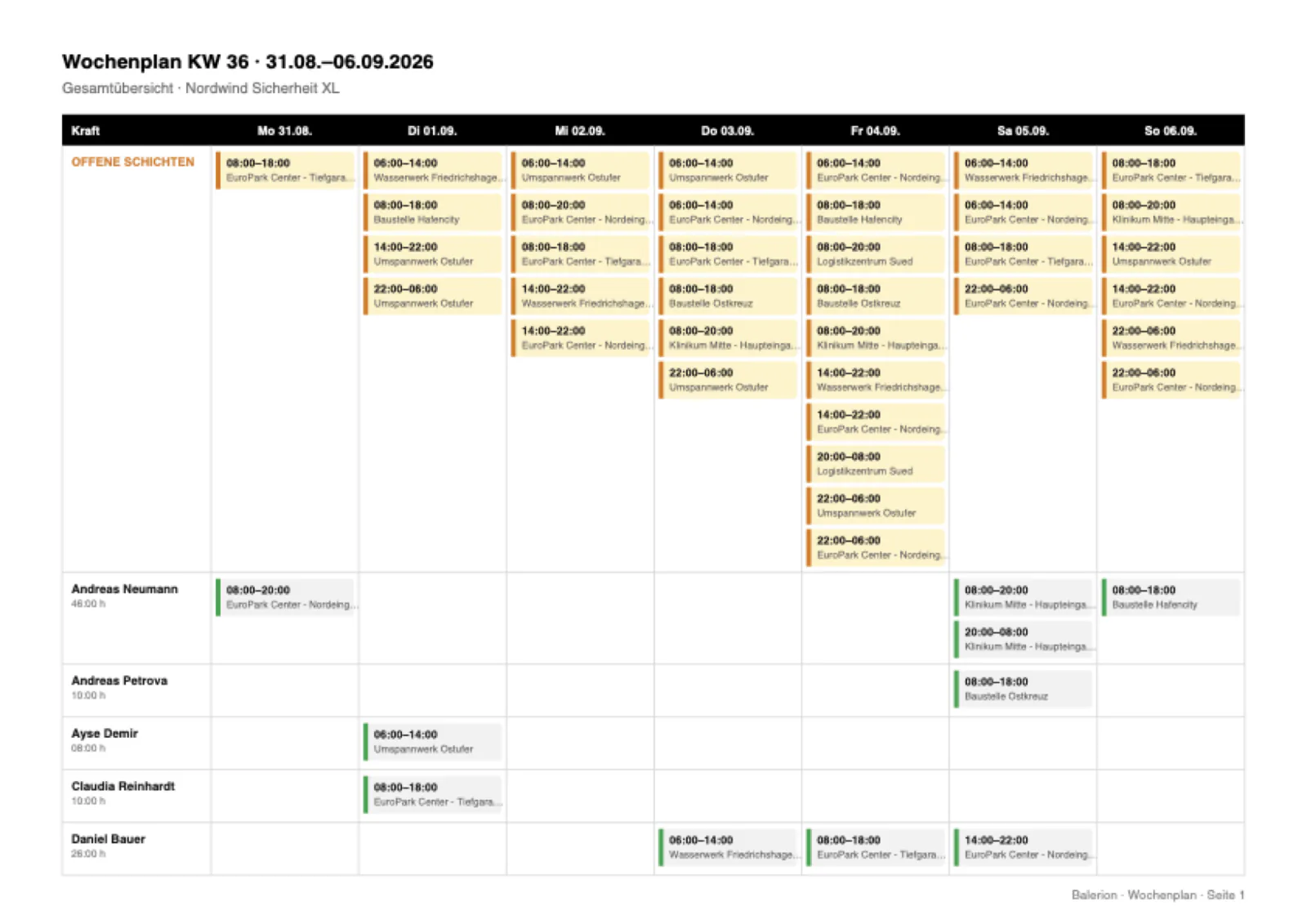
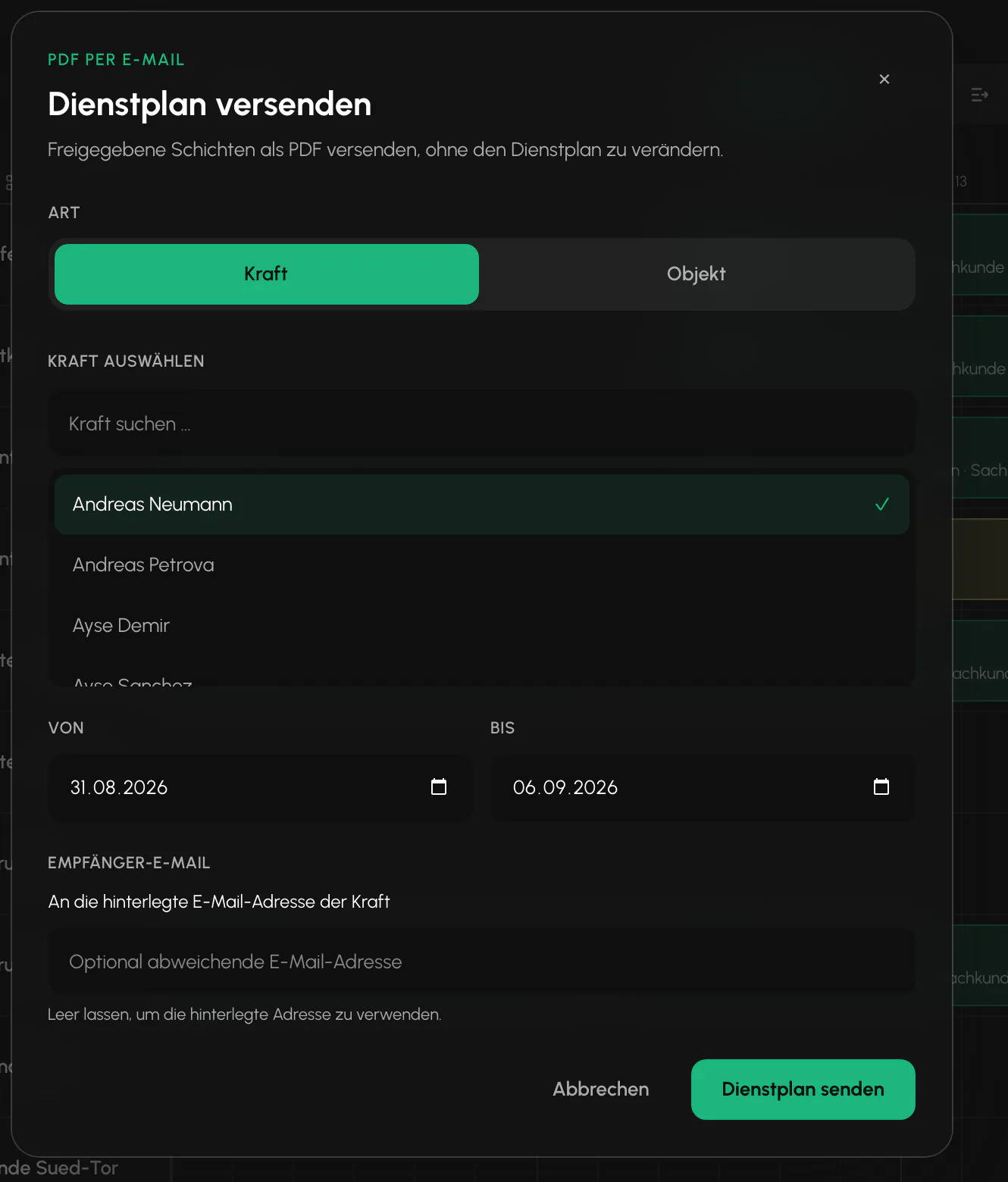
Only published shifts are sent
Drafts from the planning mode are not included in the PDF. A period containing only drafts is treated as empty, and sending is rejected with a notice instead of sending an empty PDF.
For night shifts, the end field explicitly names the following day so that nothing is misunderstood in the printout.
Log and change marker
Every delivery is logged with the target, period, recipient, number of shifts, and timestamp. When sending to a security officer's stored address, only a masked form is saved in the log.
Scheduling uses the log as an anchor point. Changes since the last delivery are marked in the plan. This lets you see what the recipient does not yet know.
Related
- Duty Roster and SchedulingSite rows on a timeline. Draw, resize, split and assign. A set of rules checks every assignment in the background.
- Customer PortalYour customer sees their sites without you sending anything by email. And without seeing more than you enable.
- The App for Security OfficersFive tabs, no password, and everything a security officer needs while on duty.
Updated on: 03.09.2026