'%20fill='%23fff'%20fill-rule='evenodd'%20clip-rule='evenodd'%20d='M1.94516e-05%200.0202086C0.0420195%201.22421%2015.477%2022.8672%2025.974%2036.4392C80.466%20106.895%20148.48%20166.337%20231.974%20216.477C250.654%20227.694%20271.214%20239.258%20308.974%20259.785C390.041%20303.855%20418.027%20323.655%20445.375%20356.29C457.567%20370.839%20458.267%20370.657%20438.242%20358.146C387.532%20326.465%20356.693%20316.359%20305.474%20314.635C278.901%20313.741%20256.584%20316.015%20228.224%20322.508C219.385%20324.532%20216.216%20326.29%20221.407%20326.29C233.608%20326.29%20264.586%20334.87%20282.263%20343.145C295.881%20349.52%20314.974%20361.858%20314.974%20364.283C314.974%20364.695%20312.612%20365.334%20309.724%20365.703C241.199%20374.463%20154.183%20428.191%2092.562%20499.79C75.09%20520.091%2071.7%20524.859%2077.035%20521.628C78.926%20520.482%2084.728%20516.968%2089.927%20513.819C112.706%20500.021%20145.195%20487.437%20169.935%20482.828C181.824%20480.613%20205.552%20478.817%20211.298%20479.696L216.122%20480.435L203.794%20493.112C142.137%20556.516%20104.948%20625.881%2092.913%20699.925C90.533%20714.569%2090.783%20715.586%2094.806%20707.641C105.92%20685.691%20127.936%20659.716%20144.474%20649.04C150.781%20644.969%20158.103%20641.29%20159.899%20641.29C160.273%20641.29%20161.083%20648.827%20161.699%20658.04C165.47%20714.441%20188.011%20764.593%20226.674%20802.603C262.563%20837.887%20306.066%20866.035%20398.474%20913.767C434.747%20932.503%20444.973%20937.877%20458.974%20945.562C570.722%201006.9%20619.955%201060.37%20650.021%201153.06C653.459%201163.66%20656.39%201172.21%20656.535%201172.06C656.68%201171.91%20657.989%201166.17%20659.445%201159.29C682.51%201050.31%20655.152%20934.035%20584.506%20840.79C562.617%20811.9%20543.899%20791.508%20489.954%20737.79C426.931%20675.032%20411.607%20655.099%20405.006%20627.29C392.323%20573.863%20438.939%20538.423%20500.849%20554.425C526.675%20561.1%20544.604%20577.062%20549.915%20598.107L551.59%20604.743L564.032%20606.485C634.063%20616.289%20704.147%20646.368%20736.626%20680.561C749.96%20694.598%20749.787%20706.055%20736.132%20713.269L732.474%20715.202L742.766%20715.246C753.94%20715.294%20764.079%20713.573%20776.282%20709.556L784.091%20706.987L786.782%20708.95C791.451%20712.357%20797.8%20722.825%20799.144%20729.336C800.681%20736.776%20800.851%20736.757%20806.282%20728.54C830.903%20691.286%20836.954%20633.079%20820.076%20595.855L817.271%20589.667L808.372%20586.346C782.299%20576.613%20762.637%20558.586%20741.181%20524.743C729.885%20506.926%20727.08%20500.527%20723.898%20485.323C719.333%20463.505%20718.535%20461.808%20707.053%20449.509C690.138%20431.393%20684.217%20423.522%20661.746%20389.29C602.592%20299.172%20519.411%20225.38%20413.356%20168.936C385.699%20154.217%20328.981%20128.949%20327.322%20130.609C327.135%20130.796%20332.883%20134.879%20340.096%20139.682C394.802%20176.112%20443.502%20218.504%20467.755%20250.806C475.015%20260.475%20485.69%20277.926%20484.843%20278.74C484.64%20278.936%20480.199%20275.945%20474.974%20272.096C430.93%20239.644%20400.199%20223.792%20315.974%20190.078C174.722%20133.537%20108.045%2094.3042%2016.767%2014.0202C7.53105%205.89621%20-0.0139805%20-0.403791%201.94516e-05%200.0202086ZM592.467%20436.927C603.971%20451.343%20612.149%20463.814%20615.502%20472.054C626.595%20499.317%20631.458%20503.825%20657.974%20511.427C664.299%20513.24%20674.182%20517.081%20679.937%20519.961C685.691%20522.842%20690.502%20525.096%20690.627%20524.971C690.752%20524.845%20688.519%20521.149%20685.664%20516.757C682.81%20512.364%20678.077%20504.207%20675.147%20498.629C668.633%20486.227%20664.825%20482.16%20649.462%20471.196C634.986%20460.866%20585.876%20426.936%20584.662%20426.427C584.187%20426.228%20587.699%20430.953%20592.467%20436.927Z'/%3e%3c/svg%3e)
Payroll Handoff
The reviewed payroll preview is sent to the payroll office as a run. Every run is dated and traceable.
Requirements
- Owner role
- Payroll preview for the month reviewed
- Personnel numbers maintained for the security officers
- For DATEV: consultant and client numbers are available
Selecting an interface
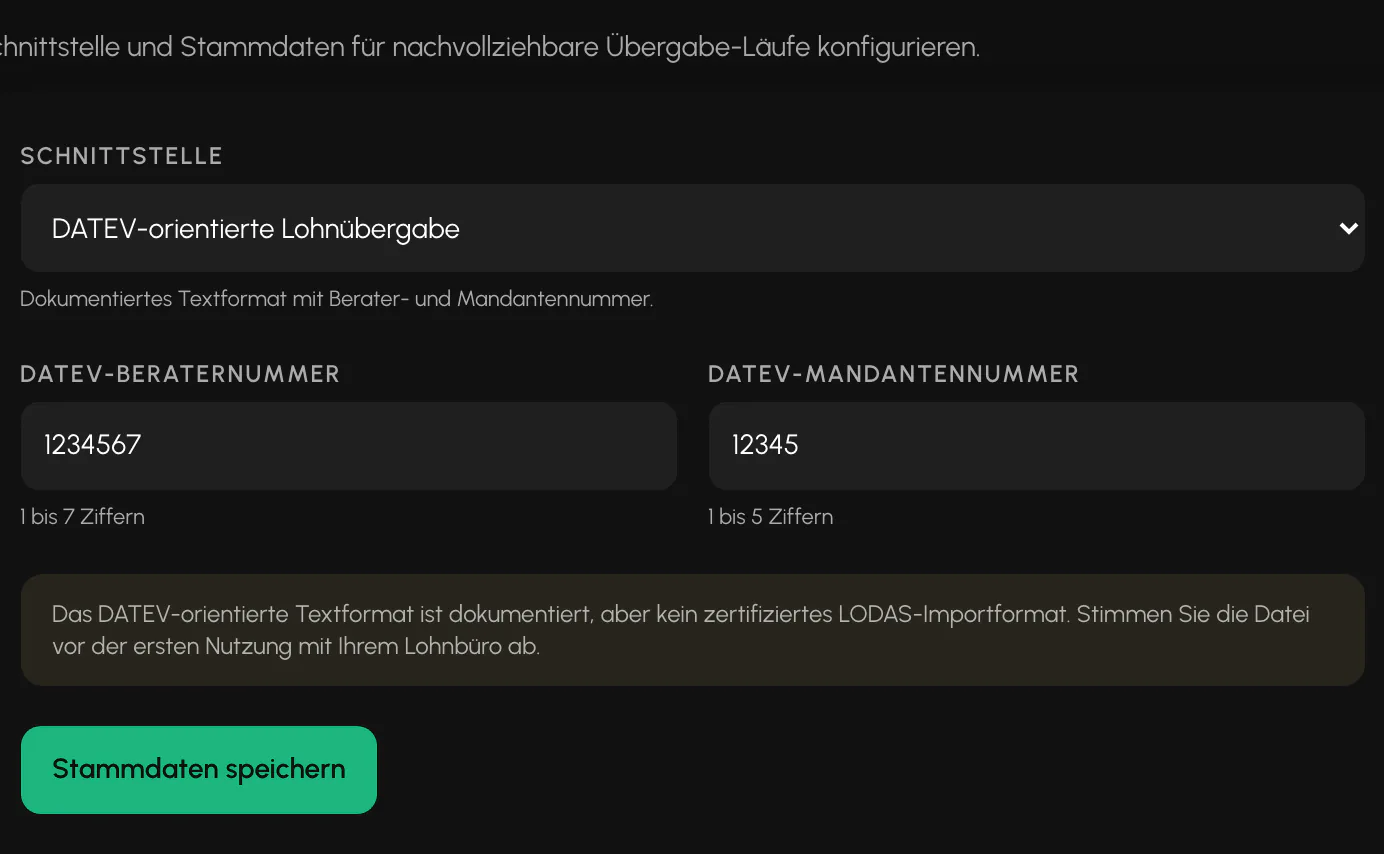
Settings, Payroll section, Payroll handoff card. Two formats are available:
- Universal CSV long format for coordination with the payroll office.
- DATEV-oriented text format with consultant and client numbers. The consultant number has 1 to 7 digits, and the client number 1 to 5.
What the DATEV format is and is not
Important to prevent problems with the payroll office: The text format is documented, but is not a certified LODAS import format. Coordinate the first run with your payroll office before using it in production.
The notice also appears directly on the card. It is deliberately placed there because an incorrectly assumed import format may not become apparent until the end of the month.
Creating a run
The runs are on a separate subpage: in Payroll, go to the "Handoff to payroll office" card, then select "Open handoff".
A run covers exactly one complete calendar month. A partial period is rejected so that the payroll office does not receive half a month.
The run freezes the month's data as a numbered record and creates the downloadable file. Two notices may appear:
- Missing personnel numbers. The file is still created, but the affected fields remain empty. The notice states the number of security officers.
- Period not yet closed. The run is still created. The notice only provides a reminder. The cleaner sequence is to close the period and then hand it off.
If master data for the selected interface is missing, such as the consultant number, the message states exactly which data is missing.
What changed since the previous run
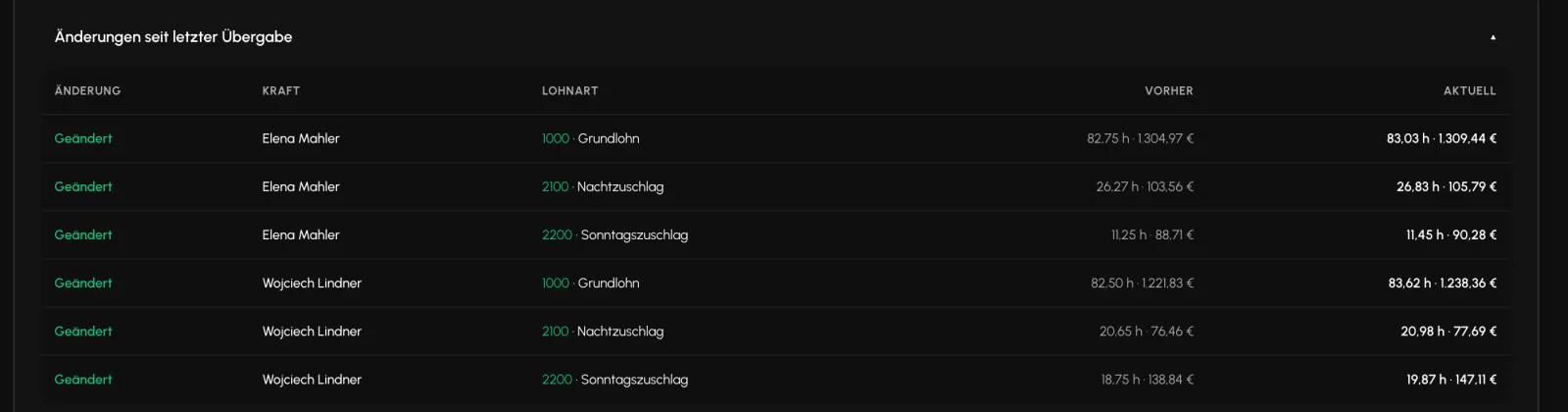
Below the runs, "Changes since last handoff" shows the security officer, wage type, previous value and current value in each row, labeled New, Changed or Removed.
This documents a subsequent handoff without requiring two files to be compared side by side. If there is no active run, the entire monthly data set is shown as new.
Reset and history
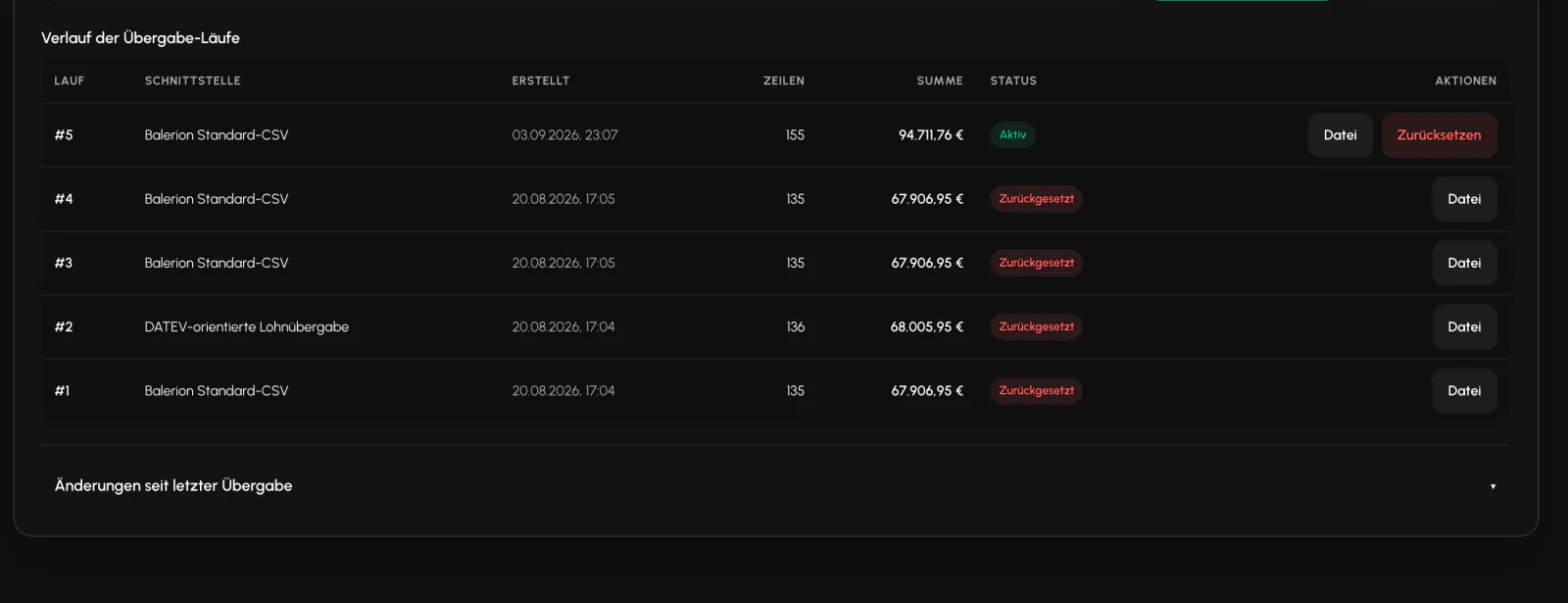
The history lists each run's number, interface, creation date, number of rows, total and status. A run is Active or Reset, and the month is correspondingly Handed off on or Not handed off yet.
A run can be reset. A reason of 10 to 500 characters is required. It does not disappear. It remains visible in the history, but no longer counts as handed off or toward the difference calculation. This preserves the record that it existed.
Do not confuse these: The handoff run is different from "Send to accounting". One freezes a numbered data set, while the other sends an analysis by email.
Related
- Payroll and PremiumsBalerion Security calculates gross pay and tax-free premiums. The payroll office handles payroll tax, social insurance and net pay.
- Wage Types and Premium RulesThe items carry the wage type numbers used by your payroll software so that the payroll export can be processed there. Maintain them here.
- Period ClosingA closed month remains fully readable. Only write operations are locked.
Updated on: 03.09.2026